
In the first post of this series I set up the AKS managed Flux extension and used it to reconcile a plain Kustomize sample, Podinfo. That proved the basics: a Flux configuration, a GitRepository, and a Kustomization that applies whatever is at a Git path.
Most real clusters also run Helm charts, so the natural next question is: does the managed extension handle Helm the same way, or does it need something extra? I kept the same cluster and extension from the first post and added a second, independent Flux configuration that deploys a Helm chart from Git. Short answer: yes it works, and there is one extra thing you need to get right — RBAC for the Helm release — that the Kustomize demo never had to deal with.
Everything is in the same Code-Snippets repository as the first post. This lesson adds its own files; it does not replace or change the Kustomize demo.
New to this series? Start with Getting started with the AKS Flux extension for the cluster, the extension, and the Kustomize basics. If you are coming from self-managed Flux, Bootstrapping Flux on AKS covers
flux bootstrapinstead.
One Cluster, Independent Lessons
The whole point of this series is that I provision the AKS cluster and the microsoft.flux extension once, in terraform/main.tf, and then add one lesson per Flux configuration on top of it. Terraform loads every .tf file in the directory, so adding helm-demo.tf does not create a second infrastructure stack — it is still the same cluster and the same extension.
| Layer or lesson | Files | Azure configuration | Application namespace |
|---|---|---|---|
| Shared foundation | terraform/main.tf | Managed extension in flux-system | Shared AKS cluster |
| Git + Kustomize | terraform/kustomize-demo.tf, gitops/kustomize | cluster-config | flux-demo |
| Helm chart in Git | terraform/helm-demo.tf, gitops/helm | helm-demo-config | kubeplay-helm |
Neither Flux configuration knows about the other. A failed Helm release does not make cluster-config non-compliant, and deleting the Helm configuration later does not touch Podinfo. They show up as two separate rows in the Azure portal’s GitOps list on the same cluster.
The chart I deploy is KubePlay, a small multi-service demo app, pulled from its own repository rather than from Code-Snippets. That is deliberate: it shows Flux reconciling a chart that lives somewhere other than the manifests repository, which is closer to how most teams actually keep charts and application config separate.
What We Are Building
- A second Azure Flux configuration,
helm-demo-config, pointing atgitops/helmin the same Git repository and branch as the Kustomize demo. - A
GitRepository(helm-demo-chart) that clones the external k8s-demo-sample-app repository and packages only its chart directory. - A
HelmRelease(helm-demo-kubeplay) that builds the chart and installs it into a newkubeplay-helmnamespace. - A dedicated
ServiceAccount,Role, andRoleBindingso Helm can manage its release without needing cluster-wide permissions.
This lesson currently teaches a chart stored in Git, not a published HTTP HelmRepository or an OCI registry. That is a deliberate scope decision so this post stays focused on the RBAC and release mechanics; a future post can cover HelmRepository or OCI sources in their own lesson.
The Terraform: A Second, Independent Flux Configuration
The important part is that this is a completely separate azurerm_kubernetes_flux_configuration, not a change to the one from the first post:
# Reconcile the Helm lesson independently using the shared cluster and extension.
resource "azurerm_kubernetes_flux_configuration" "kubeplay" {
  count                             = contains(var.enabled_demos, "helm") ? 1 : 0
  name                              = "helm-demo-config"
  cluster_id                        = azurerm_kubernetes_cluster.this.id
  namespace                         = "helm-demo-config"
  scope                             = "cluster"
  continuous_reconciliation_enabled = true

  git_repository {
    url                      = var.git_repository_url
    reference_type           = "branch"
    reference_value          = var.git_branch
    sync_interval_in_seconds = 60
    timeout_in_seconds       = 120
  }

  kustomizations {
    name                       = "helm"
    path                       = var.gitops_helm_path
    garbage_collection_enabled = true
    sync_interval_in_seconds   = 60
    retry_interval_in_seconds  = 30
    timeout_in_seconds         = 600
  }

  depends_on = [azurerm_kubernetes_cluster_extension.flux]

  lifecycle {
    precondition {
      condition     = var.git_repository_url != "" && var.gitops_helm_path != null
      error_message = "The Helm demo requires git_repository_url and a non-null gitops_helm_path."
    }
  }
}
A few things worth calling out:
namespace = "helm-demo-config"is a different source namespace fromcluster-configin the first post. Azure names the generated FluxKustomizationhelm-demo-config-helm, following the same<configuration>-<kustomization name>pattern I noted last time.countgated byenabled_demosis howdeploy.sh --demo helmenables this configuration without touching the Kustomize one. Pass--demo allto enable both.timeout_in_seconds = 600is longer than the Kustomize demo’s five minutes. Pulling a chart, templating it, and waiting for a Helm install to report healthy legitimately takes longer than applying plain manifests.- The
preconditionis a small safety net: Terraform fails fast with a clear message instead of applying a Flux configuration that points nowhere.
The Flux Kustomization inside this configuration is called helm, but it still applies the Kubernetes manifests using server-side apply. Those manifests include a GitRepository and a HelmRelease; the source and Helm controllers then use them to package and install the chart.
The GitOps Directory, Piece by Piece
gitops/
  helm/
    kustomization.yaml      # includes prerequisites, source, and release
    gitrepository.yaml      # clones the chart repository
    helmrelease.yaml         # installs the chart with override values
    prerequisites/
      kustomization.yaml
      namespace.yaml         # the kubeplay-helm namespace
      rbac.yaml              # ServiceAccount, Role, RoleBinding
1. Package the chart directory
# Flux source that clones the repository containing the Helm chart.
apiVersion: source.toolkit.fluxcd.io/v1
kind: GitRepository
metadata:
  name: helm-demo-chart
  namespace: kubeplay-helm
spec:
  interval: 1m
  url: https://github.com/kasunsjc/k8s-demo-sample-app
  ref:
    branch: main
  # Include only the chart directory in the packaged artifact.
  ignore: |
    /*
    !/deploy/helm/kubeplay
The ignore block flips the usual Flux ignore semantics: exclude everything, then explicitly re-include the one chart directory. Flux clones the repository, then packages only deploy/helm/kubeplay into the GitRepository artifact. The source controller builds a HelmChart artifact from that path for the Helm controller. Unrelated files are excluded from the artifact, although the GitRepository still tracks the branch’s revision.
2. Install the chart with override values
This is the initial HelmRelease used for the installation below. The repository now contains the later values and drift-detection changes described in the hands-on sections.
# Installs the chart from the GitRepository above. Values here override the chart's values.yaml.
apiVersion: helm.toolkit.fluxcd.io/v2
kind: HelmRelease
metadata:
  name: helm-demo-kubeplay
  namespace: kubeplay-helm
spec:
  releaseName: helm-demo-kubeplay
  serviceAccountName: helm-demo-deployer
  interval: 5m
  timeout: 10m
  chart:
    spec:
      chart: ./deploy/helm/kubeplay
      reconcileStrategy: Revision
      sourceRef:
        kind: GitRepository
        name: helm-demo-chart
  install:
    remediation:
      retries: 3
  upgrade:
    remediation:
      retries: 3
  values:
    global:
      imageRegistry: ''
      imageTag: '0.1.2'
      imagePullPolicy: IfNotPresent
    ui:
      image: kasunsjc/kubeplay-ui-gateway
      title: KubePlay via Flux
    inspector:
      image: kasunsjc/kubeplay-inspector-api
      replicas: 3
      hpa:
        enabled: false
    notes:
      image: kasunsjc/kubeplay-notes-api
    worker:
      image: kasunsjc/kubeplay-worker
    redis:
      storage:
        storageClass: managed-csi
    ingress:
      enabled: false
The settings I paid the most attention to:
chart.spec.chart: ./deploy/helm/kubeplayis the path to the chart inside the GitRepository’s artifact, not a repository URL. Because the source already excludes everything else, this path only needs to resolve within what Flux kept.reconcileStrategy: Revisionmeans Flux watches the Git revision for changes to the chart itself, not just a chart version field. Push a change to the chart’s templates and Flux picks it up on the next sync, exactly like the Kustomize demo picks up manifest changes.valueshere override the chart’s ownvalues.yaml. This is the same place you would put per-environment values if you had more than one.install.remediation.retries/upgrade.remediation.retriestell the Helm controller to retry a failed install or upgrade up to three times before giving up, instead of leaving the release stuck on the first failure.- Images are pulled straight from Docker Hub (
kasunsjc/kubeplay-<service>:0.1.2), so there is no container registry to attach to the cluster for this demo.
3. Tie it together
apiVersion: kustomize.config.k8s.io/v1beta1
kind: Kustomization
resources:
  - prerequisites
  - gitrepository.yaml
  - helmrelease.yaml
This is the Kustomize build file that the Flux Kustomization named helm applies. It bundles the namespace and RBAC prerequisites together with the Helm source and release, so one Flux configuration creates everything the chart needs, in the right order.
Why a Helm Release Needs Its Own RBAC
This was the one part that was not obvious to me coming from the Kustomize demo, where I never had to think about RBAC at all.
apiVersion: v1
kind: Namespace
metadata:
  name: kubeplay-helm
---
apiVersion: v1
kind: ServiceAccount
metadata:
  name: helm-demo-deployer
  namespace: kubeplay-helm
automountServiceAccountToken: false
---
apiVersion: rbac.authorization.k8s.io/v1
kind: Role
metadata:
  name: helm-demo-deployer
  namespace: kubeplay-helm
rules:
  - apiGroups: ['']
    resources: [configmaps, persistentvolumeclaims, pods, secrets, serviceaccounts, services]
    verbs: [get, list, watch, create, update, patch, delete]
  - apiGroups: [apps]
    resources: [deployments, replicasets, statefulsets]
    verbs: [get, list, watch, create, update, patch, delete]
  - apiGroups: [batch]
    resources: [cronjobs, jobs]
    verbs: [get, list, watch, create, update, patch, delete]
  - apiGroups: [networking.k8s.io]
    resources: [ingresses, networkpolicies]
    verbs: [get, list, watch, create, update, patch, delete]
  - apiGroups: [autoscaling]
    resources: [horizontalpodautoscalers]
    verbs: [get, list, watch, create, update, patch, delete]
  - apiGroups: [policy]
    resources: [poddisruptionbudgets]
    verbs: [get, list, watch, create, update, patch, delete]
---
apiVersion: rbac.authorization.k8s.io/v1
kind: RoleBinding
metadata:
  name: helm-demo-deployer
  namespace: kubeplay-helm
roleRef:
  apiGroup: rbac.authorization.k8s.io
  kind: Role
  name: helm-demo-deployer
subjects:
  - kind: ServiceAccount
    name: helm-demo-deployer
    namespace: kubeplay-helm
Why does a Helm release need a service account and a Role at all? In this managed-extension setup, the Helm controller runs with
--default-service-account=flux-applier. Instead of using its own controller permissions, it impersonates a service account in theHelmRelease’s namespace. Service accounts with the same name in different namespaces are different identities, so permissions granted tohelm-demo-config/flux-applierdo not carry over tokubeplay-helm/flux-applier.This demo sidesteps that by explicitly selecting a different, purpose-built identity with
spec.serviceAccountName: helm-demo-deployer. TheServiceAccountsupplies the identity, theRolegrants namespace-scoped permissions, and theRoleBindingconnects them. Helm needs access to Secrets to store release history, plus permission to manage whatever resource types the chart creates. Without these permissions, installation fails early with something likesecrets is forbidden, before any application pod gets created.With a typical self-managed OSS Flux installation, the Helm controller’s own service account usually already has broad permissions, so this per-release RBAC may not be strictly necessary there. OSS Flux also supports restricted service-account impersonation if you want it. This is a controller-configuration distinction, not something tied to the chart source — switching from a Git chart to a
HelmRepositorylater would not remove the need for this RBAC.
The Role grants permissions only within kubeplay-helm, including some optional chart resource kinds. If another chart needs additional namespaced resource kinds, add the required permissions to the Role. CRDs and other cluster-scoped resources are different: adding them to a namespaced Role does not grant access. Provision them separately with an authorized identity, or explicitly grant the Helm service account the necessary cluster-level permissions through a ClusterRole and ClusterRoleBinding.
Because gitops/helm/kustomization.yaml includes prerequisites as one of its resources, Terraform and the Flux configuration never need a separate manual RBAC step — publishing the Git path is enough.
Deploy It
I kept the same Terraform directory, state, cluster, and extension from the first post. If you have not set that up yet, do that first with bash deploy.sh --demo kustomize, then come back here.
cd AKS-Flux-Extension
az login
az account set --subscription "<your-subscription-name>"
If you already created terraform/terraform.tfvars for the Kustomize demo, you do not need to change it — the default Helm path already matches this repository’s layout:
git_repository_url = "https://github.com/YOUR-ACCOUNT/Code-Snippets.git"
git_branch         = "main"
gitops_path        = "./AKS-Flux-Extension/gitops/kustomize"

# Override only if your repository layout differs:
# gitops_helm_path = "./AKS-Flux-Extension/gitops/helm"
Then enable just the Helm lesson:
bash deploy.sh --demo helmUse --demo all instead if you want both lessons enabled from a clean cluster. Either way, deploy.sh still runs terraform apply -auto-approve, so read your variables first if you want to see the plan before it runs.
Check That It Actually Worked
Same two-level check as the first post: Azure’s view of compliance, and the cluster’s view of the actual objects. These are the real outputs from my own cluster.
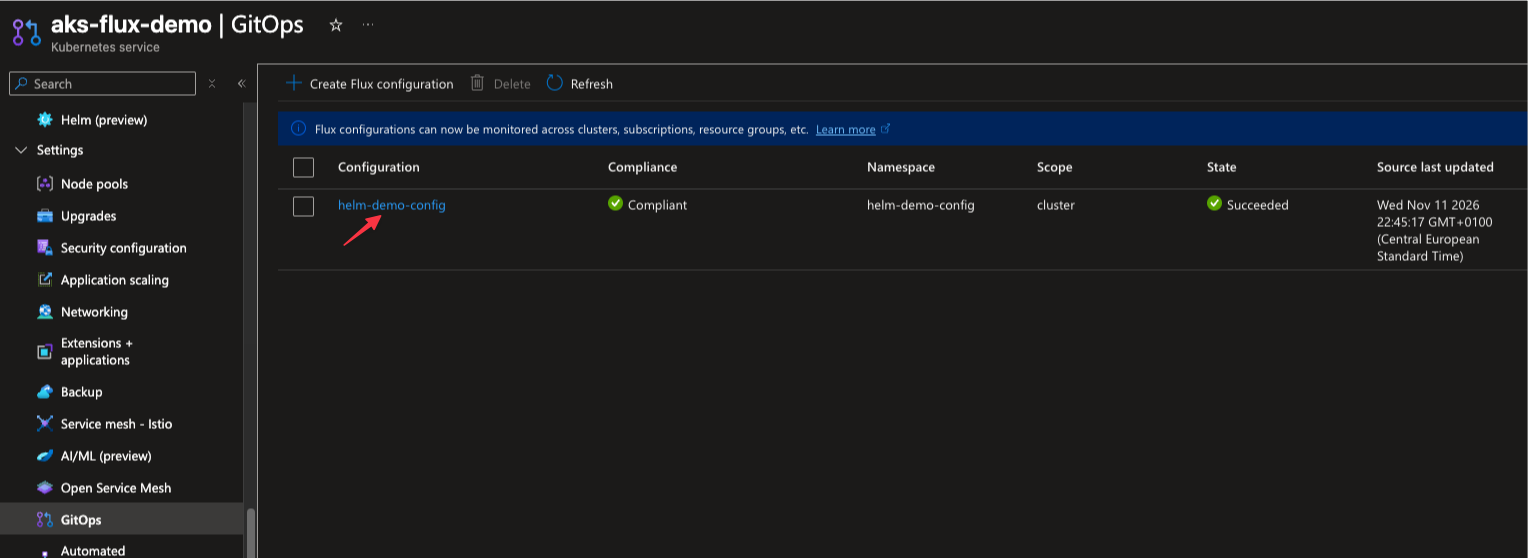
In the Azure portal, open the AKS resource and select GitOps. The helm-demo-config row shows Compliant and a provisioning state of Succeeded:
Select helm-demo-config to open its overview. Here you can check the source repository, tracked branch, last synced commit, and reconciliation settings. The repository shown is Code-Snippets, which supplies the Flux manifests; the separate chart source is defined inside those manifests.
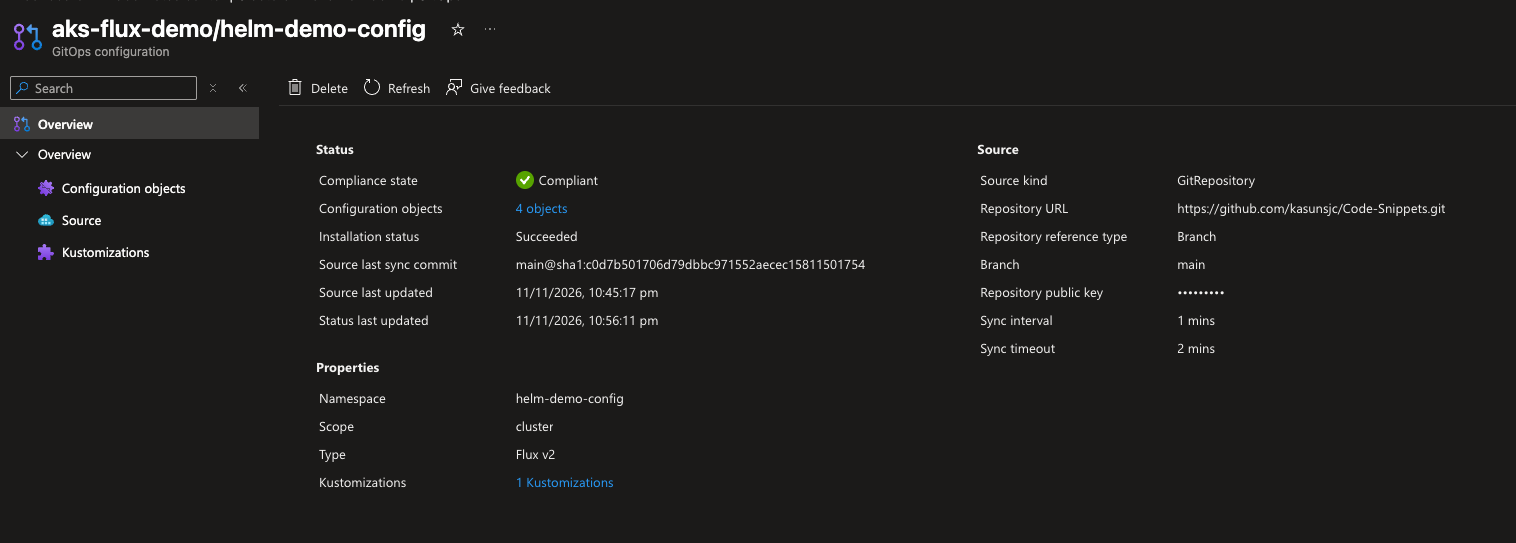
These portal screenshots show the initial installation, before the values change and Helm upgrade demonstrated later in this post.
For the same compliance information from the CLI:
RESOURCE_GROUP="$(terraform -chdir=terraform output -raw resource_group_name)"
CLUSTER_NAME="$(terraform -chdir=terraform output -raw cluster_name)"

az k8s-configuration flux show --resource-group "$RESOURCE_GROUP" \
  --cluster-name "$CLUSTER_NAME" --cluster-type managedClusters --name helm-demo-config \
  --query "{complianceState:complianceState, statuses:statuses[].{kind:kind, name:name, namespace:namespace, complianceState:complianceState}}"
{
"complianceState": "Compliant",
"statuses": [
{ "kind": "GitRepository", "name": "helm-demo-config", "namespace": "helm-demo-config", "complianceState": "Compliant" },
{ "kind": "Kustomization", "name": "helm-demo-config-helm", "namespace": "helm-demo-config", "complianceState": "Compliant" },
{ "kind": "HelmRelease", "name": "helm-demo-kubeplay", "namespace": "kubeplay-helm", "complianceState": "Compliant" },
{ "kind": "GitRepository", "name": "helm-demo-chart", "namespace": "kubeplay-helm", "complianceState": "Compliant" }
]
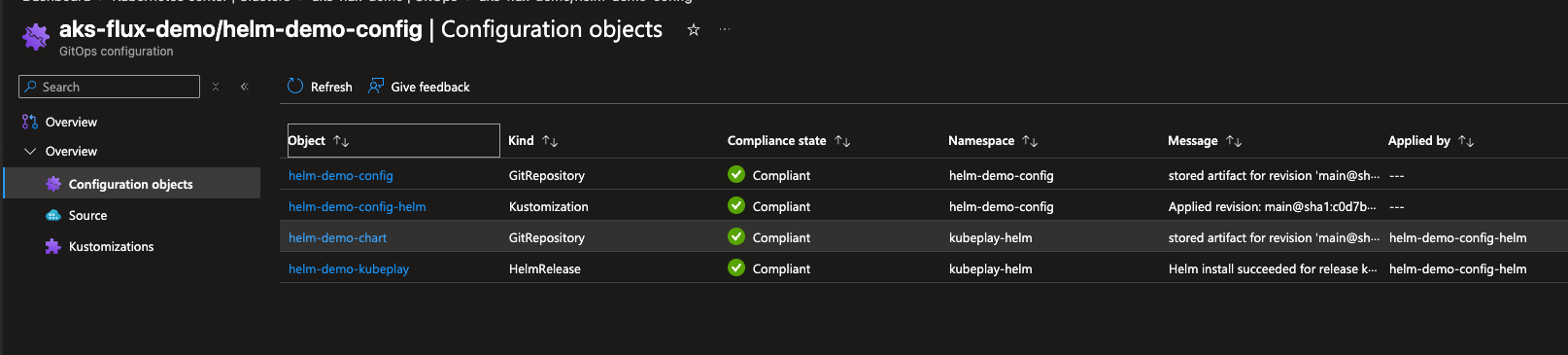
}Four tracked objects, not two. That is the first thing worth noticing: a Helm lesson involves two GitRepository objects, one Kustomization, and one HelmRelease, where the Kustomize lesson only ever had one GitRepository and one Kustomization. The next section explains why.
The portal’s Configuration objects view lists those four objects and their namespaces. Its Applied by column links helm-demo-chart and helm-demo-kubeplay to the parent helm-demo-config-helm Kustomization:
From inside the cluster, the controllers doing the work are the same flux-system pods as before, plus two I had not used yet:
kubectl get pods -n flux-systemNAME READY STATUS RESTARTS AGE
fluxconfig-agent-7c5d9bc6dc-thkcj 2/2 Running 0 18m
fluxconfig-controller-56f5b6c7c6-jhzmp 2/2 Running 0 18m
helm-controller-6559bbfbfd-blpv4 1/1 Running 0 18m
kustomize-controller-7598648dff-tf586 1/1 Running 0 18m
notification-controller-86cf699f75-vk2tg 1/1 Running 0 18m
source-controller-84449dc7b5-9j47h 1/1 Running 0 18mhelm-controller is new here. It is already part of the managed extension, it just had nothing to do until this lesson created a HelmRelease.
What Azure Generated For You
As with the Kustomize demo, I never wrote these Flux objects by hand — Terraform and the Git path generated them. Here is what is actually on my cluster, with noisy fields (UIDs, resource versions, timestamps) removed for readability.
The Azure-generated source, in the helm-demo-config namespace. This is the one azurerm_kubernetes_flux_configuration created for me, the same way cluster-config’s GitRepository was generated in the first post:
apiVersion: source.toolkit.fluxcd.io/v1
kind: GitRepository
metadata:
  name: helm-demo-config
  namespace: helm-demo-config
  labels:
    clusterconfig.azure.com/is-managed: "true"
    clusterconfig.azure.com/name: helm-demo-config
    clusterconfig.azure.com/namespace: helm-demo-config
  ownerReferences:
  - apiVersion: clusterconfig.azure.com/v1alpha1
    blockOwnerDeletion: true
    controller: true
    kind: FluxConfig
    name: helm-demo-config
spec:
  interval: 1m0s
  ref:
    branch: main
  timeout: 2m0s
  url: https://github.com/kasunsjc/Code-Snippets.git
status:
  artifact:
    revision: main@sha1:c0d7b501706d79dbbc971552aecec15811501754
    size: 454105
  conditions:
  - message: stored artifact for revision 'main@sha1:c0d7b501706d79dbbc971552aecec15811501754'
    reason: Succeeded
    status: "True"
    type: Ready
Notice the clusterconfig.azure.com labels and the FluxConfig owner reference — exactly the markers from the first post that tell you Azure generated and owns this object. Its artifact is 454 KB because it clones the whole Code-Snippets repository, same as cluster-config did.
The Kustomize-applied source, in the kubeplay-helm namespace. This one I wrote by hand in gitrepository.yaml, and it reconciles through the Flux Kustomization, not directly from Terraform:
apiVersion: source.toolkit.fluxcd.io/v1
kind: GitRepository
metadata:
  name: helm-demo-chart
  namespace: kubeplay-helm
  labels:
    kustomize.toolkit.fluxcd.io/name: helm-demo-config-helm
    kustomize.toolkit.fluxcd.io/namespace: helm-demo-config
spec:
  interval: 1m
  ref:
    branch: main
  timeout: 60s
  url: https://github.com/kasunsjc/k8s-demo-sample-app
  ignore: |
    /*
    !/deploy/helm/kubeplay
status:
  artifact:
    revision: main@sha1:2a016b705539b99d507c46603b582387b2ccc3f7
    size: 6364
  conditions:
  - message: stored artifact for revision 'main@sha1:2a016b705539b99d507c46603b582387b2ccc3f7'
    reason: Succeeded
    status: "True"
    type: Ready
Different labels this time: kustomize.toolkit.fluxcd.io/* instead of clusterconfig.azure.com/*, and no FluxConfig owner reference. This object is not Azure-generated — it is a plain YAML file I wrote, applied like any other resource by the helm-demo-config-helm Kustomization. Its artifact is only 6 KB because the ignore block excludes everything except the chart directory. Two objects, same kind, two very different ownership stories — that distinction was not obvious to me until I compared the actual YAML.
The Kustomization that ties it together, in helm-demo-config:
apiVersion: kustomize.toolkit.fluxcd.io/v1
kind: Kustomization
metadata:
  name: helm-demo-config-helm
  namespace: helm-demo-config
  labels:
    clusterconfig.azure.com/is-managed: "true"
    clusterconfig.azure.com/name: helm-demo-config
    clusterconfig.azure.com/namespace: helm-demo-config
  ownerReferences:
  - apiVersion: clusterconfig.azure.com/v1alpha1
    blockOwnerDeletion: true
    controller: true
    kind: FluxConfig
    name: helm-demo-config
spec:
  interval: 1m0s
  path: ./AKS-Flux-Extension/gitops/helm
  prune: true
  retryInterval: 30s
  serviceAccountName: flux-applier
  sourceRef:
    kind: GitRepository
    name: helm-demo-config
    namespace: helm-demo-config
  timeout: 10m0s
  wait: true
status:
  conditions:
  - message: 'Applied revision: main@sha1:c0d7b501706d79dbbc971552aecec15811501754'
    reason: ReconciliationSucceeded
    status: "True"
    type: Ready
  - message: Health check passed in 71.627067ms
    reason: Succeeded
    status: "True"
    type: Healthy
  inventory:
    entries:
    - id: _kubeplay-helm__Namespace
      v: v1
    - id: kubeplay-helm_helm-demo-deployer__ServiceAccount
      v: v1
    - id: kubeplay-helm_helm-demo-deployer_rbac.authorization.k8s.io_Role
      v: v1
    - id: kubeplay-helm_helm-demo-deployer_rbac.authorization.k8s.io_RoleBinding
      v: v1
    - id: kubeplay-helm_helm-demo-kubeplay_helm.toolkit.fluxcd.io_HelmRelease
      v: v2
    - id: kubeplay-helm_helm-demo-chart_source.toolkit.fluxcd.io_GitRepository
      v: v1
  lastAppliedRevision: main@sha1:c0d7b501706d79dbbc971552aecec15811501754
This is the part that explains the layering: status.inventory here only has six entries — the namespace, the three RBAC objects, the HelmRelease, and the GitRepository. There is no Deployment, Service, StatefulSet, or CronJob in this list, even though the chart creates all of those: the Kustomization applies the gitops/helm manifests, while Helm manages the chart’s resources. Because wait: true is set, the Kustomization also checks the health of its applied resources, including the HelmRelease, before reporting success. serviceAccountName: flux-applier here is this Kustomization’s own identity (with cluster-wide permissions, same as the first post), which is a completely different identity from helm-demo-deployer inside the HelmRelease itself.
The HelmRelease, in kubeplay-helm, is where the actual chart installation is tracked:
apiVersion: helm.toolkit.fluxcd.io/v2
kind: HelmRelease
metadata:
  name: helm-demo-kubeplay
  namespace: kubeplay-helm
spec:
  chart:
    spec:
      chart: ./deploy/helm/kubeplay
      reconcileStrategy: Revision
      sourceRef:
        kind: GitRepository
        name: helm-demo-chart
  releaseName: helm-demo-kubeplay
  serviceAccountName: helm-demo-deployer
  interval: 5m
  timeout: 10m
status:
  conditions:
  - message: Helm install succeeded for release kubeplay-helm/helm-demo-kubeplay.v1
      with chart kubeplay@0.1.1+2a016b705539
    reason: InstallSucceeded
    status: "True"
    type: Ready
  - message: Helm install succeeded for release kubeplay-helm/helm-demo-kubeplay.v1
      with chart kubeplay@0.1.1+2a016b705539
    reason: InstallSucceeded
    status: "True"
    type: Released
  history:
  - action: install
    chartName: kubeplay
    chartVersion: 0.1.1+2a016b705539
    name: helm-demo-kubeplay
    namespace: kubeplay-helm
    status: deployed
    version: 1
  inventory:
    entries:
    - id: kubeplay-helm_ui-gateway_apps_Deployment
      v: v1
    - id: kubeplay-helm_notes-api_apps_Deployment
      v: v1
    - id: kubeplay-helm_inspector-api_apps_Deployment
      v: v1
    - id: kubeplay-helm_worker_apps_Deployment
      v: v1
    - id: kubeplay-helm_redis_apps_StatefulSet
      v: v1
    - id: kubeplay-helm_worker-report_batch_CronJob
      v: v1
    - id: kubeplay-helm_inspector-api_policy_PodDisruptionBudget
      v: v1
    - id: kubeplay-helm_redis-allow-clients_networking.k8s.io_NetworkPolicy
      v: v1
    - id: kubeplay-helm_notes-api-allow-gateway_networking.k8s.io_NetworkPolicy
      v: v1
(I trimmed the Services, Secrets, ConfigMap, and ServiceAccounts from this inventory listing for space — the full list has 18 entries.)
This is the second, separate inventory I mentioned above, owned by the Helm controller instead of the Kustomize controller. status.history is Helm’s own release history (install, then one entry per upgrade), and status.inventory is every object that release currently owns and will prune on an uninstall or on removal from Git. If you have used Helm directly before, this is the same bookkeeping helm list and helm get manifest give you, just reconciled continuously instead of run on demand.
Put together: the Flux Kustomization owns the namespace, RBAC, and the two Flux objects (GitRepository and HelmRelease); the HelmRelease separately owns everything the chart actually creates. Two controllers, two inventories, one continuously reconciled result.
Confirm the Application Resources
The inventory list is useful, but seeing the actual running objects is more convincing:
kubectl get all -n kubeplay-helmNAME READY STATUS RESTARTS AGE
pod/inspector-api-66c7f7b77d-94pql 1/1 Running 0 16m
pod/inspector-api-66c7f7b77d-f64l7 1/1 Running 0 16m
pod/inspector-api-66c7f7b77d-hzp8w 1/1 Running 0 16m
pod/notes-api-58b66cd549-g8nj7 1/1 Running 0 16m
pod/notes-api-58b66cd549-vddhq 1/1 Running 0 16m
pod/redis-0 1/1 Running 0 16m
pod/ui-gateway-6cdcd5466f-6tmqm 1/1 Running 0 16m
pod/ui-gateway-6cdcd5466f-xnvdf 1/1 Running 0 16m
pod/worker-67655dcd7d-t722d 1/1 Running 0 16m
pod/worker-report-29905620-qhkxc 0/1 Completed 0 2m57s
NAME TYPE CLUSTER-IP EXTERNAL-IP PORT(S) AGE
service/inspector-api ClusterIP 10.0.231.211 <none> 80/TCP 16m
service/notes-api ClusterIP 10.0.247.201 <none> 80/TCP 16m
service/redis ClusterIP None <none> 6379/TCP 16m
service/ui-gateway ClusterIP 10.0.168.237 <none> 80/TCP 16m
NAME READY UP-TO-DATE AVAILABLE AGE
deployment.apps/inspector-api 3/3 3 3 16m
deployment.apps/notes-api 2/2 2 2 16m
deployment.apps/ui-gateway 2/2 2 2 16m
deployment.apps/worker 1/1 1 1 16m
NAME READY AGE
statefulset.apps/redis 1/1 16m
NAME SCHEDULE SUSPEND ACTIVE LAST SCHEDULE AGE
cronjob.batch/worker-report */5 * * * * False 0 2m58s 16mEvery one of these — four Deployments, one StatefulSet, four Services, a CronJob, and their Pods — came from the helm-demo-deployer service account installing the chart, not from anything I ran by hand. The inspector-api Deployment shows 3/3, matching the inspector.replicas: 3 value I set in helmrelease.yaml.
Find the UI service and port-forward to see it:
kubectl get svc -n kubeplay-helm
kubectl port-forward -n kubeplay-helm service/ui-gateway 8080:80
Open http://localhost:8080 while the port-forward is running:
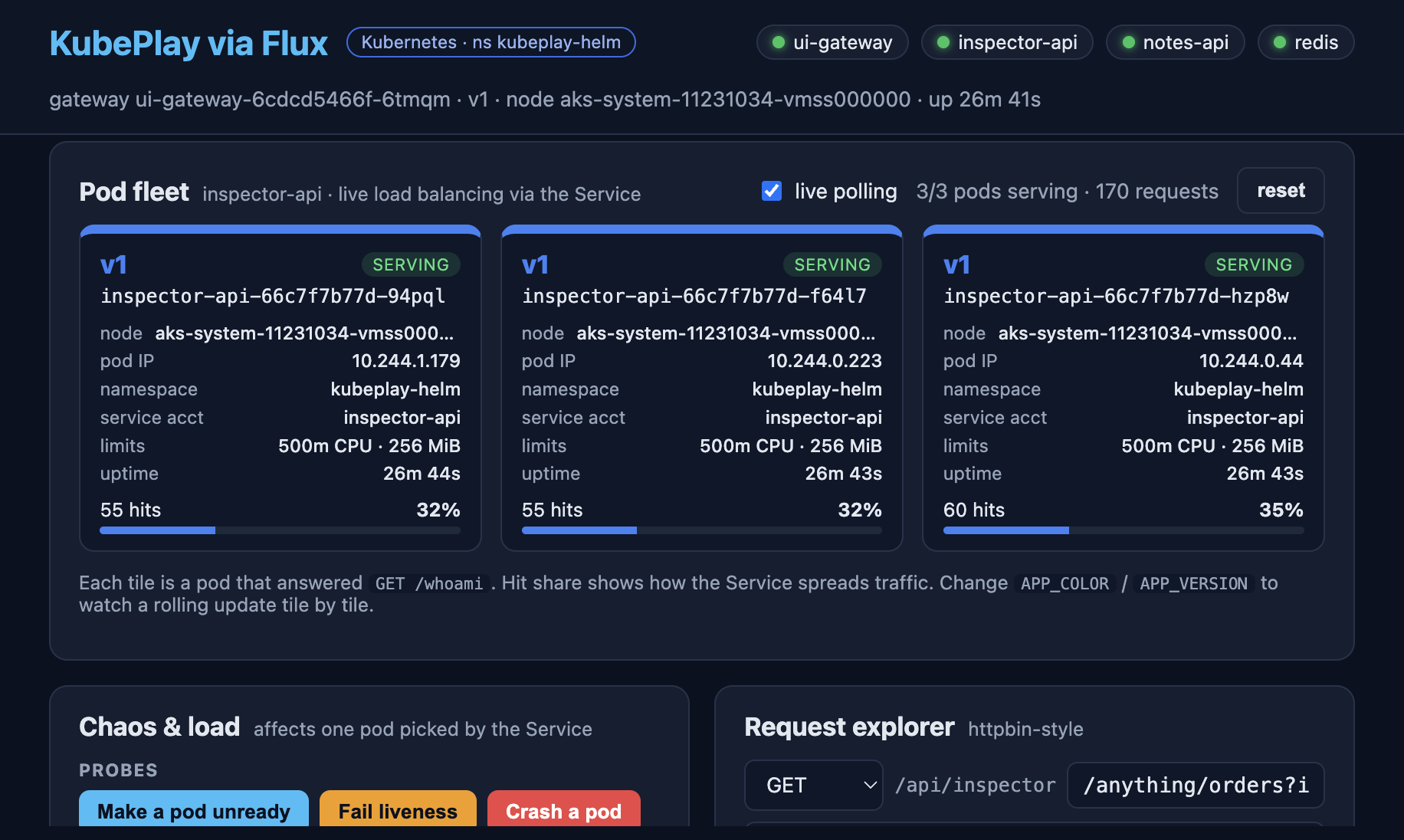
The namespace, service account, RBAC, chart source, release, and every application object came from Git. The only kubectl commands I ran were to look at the result, not to create it.
Try It: Change a Value Through Git
The point of this demo is seeing a Helm upgrade happen the same way the Kustomize demo showed a manifest change happen: through a Git push, not a pipeline or a helm upgrade command.
The current repository already contains my updated title and four replicas. To repeat the same change, first restore the initial values in the repository and branch Flux tracks. Use a fork you can push to if necessary, and configure Flux to track that fork. Edit only these fields in the existing spec.values block of AKS-Flux-Extension/gitops/helm/helmrelease.yaml, keeping the other settings, including inspector.hpa.enabled: false:
spec:
  values:
    ui:
      title: KubePlay via Flux
    inspector:
      replicas: 3
Commit and push the baseline to the tracked branch, or merge it there through a pull request. From the AKS-Flux-Extension directory, for a direct push:
git add gitops/helm/helmrelease.yaml
git commit -m "Restore KubePlay values for the upgrade demo"
git push
Before continuing, check that the Kustomization applied the baseline commit from the tracked branch, the HelmRelease has the initial values and Ready=True for its current generation, and the Deployment is 3/3 ready:
kubectl get kustomization helm-demo-config-helm -n helm-demo-config \
  -o jsonpath='{.status.lastAppliedRevision}{"\n"}'
kubectl get helmrelease helm-demo-kubeplay -n kubeplay-helm -o yaml
kubectl get deployment inspector-api -n kubeplay-helm
Compare the Kustomization revision with the tracked branch’s baseline commit. In the HelmRelease output, check the values, that metadata.generation matches status.observedGeneration, and that the Ready condition is True with the same observedGeneration. If you merged a pull request, use the resulting tracked-branch commit rather than assuming it matches your local commit.
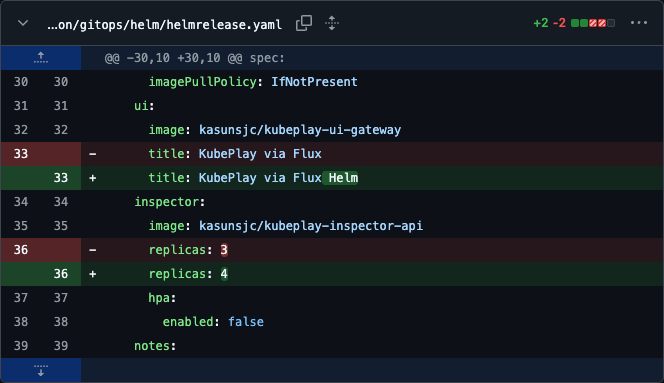
Now make the same two changes I tested: the UI title from KubePlay via Flux to KubePlay via Flux Helm, and the inspector replica count from 3 to 4. Again, edit these fields in the existing block without replacing the other values:
spec:
  values:
    ui:
      title: KubePlay via Flux Helm
    inspector:
      replicas: 4
Commit and push to the branch Flux tracks, or merge your pull request into that branch. From the AKS-Flux-Extension directory:
git add gitops/helm/helmrelease.yaml
git commit -m "Update KubePlay title and inspector replica count"
git push
My commit e513495 contains just those two value changes:
Follow the Change From Git to Helm
Watch the release while Flux picks up the commit:
kubectl get helmrelease helm-demo-kubeplay -n kubeplay-helm --watchThe Git source revision and the Kustomization’s applied revision tell you whether the configuration repository change reached the cluster:
kubectl get gitrepository helm-demo-config -n helm-demo-config \
  -o jsonpath='{.status.artifact.revision}{"\n"}'
kubectl get kustomization helm-demo-config-helm -n helm-demo-config \
  -o jsonpath='{.status.lastAppliedRevision}{"\n"}'
After reconciliation, both reported my new commit:
main@sha1:e51349572bd0ad633e8c89fd8be1ac467b03edb6
main@sha1:e51349572bd0ad633e8c89fd8be1ac467b03edb6
Then check the Helm release itself:
kubectl get helmrelease helm-demo-kubeplay -n kubeplay-helm -o yamlThis is an excerpt from my cluster after the upgrade, with unrelated fields omitted:
metadata:
  generation: 2
status:
  observedGeneration: 2
  conditions:
  - lastTransitionTime: "2026-11-11T22:30:32Z"
    message: Helm upgrade succeeded for release kubeplay-helm/helm-demo-kubeplay.v2
      with chart kubeplay@0.1.1+2a016b705539
    observedGeneration: 2
    reason: UpgradeSucceeded
    status: "True"
    type: Ready
  history:
  - action: upgrade
    chartName: kubeplay
    chartVersion: 0.1.1+2a016b705539
    status: deployed
    version: 2
  - chartName: kubeplay
    chartVersion: 0.1.1+2a016b705539
    status: superseded
    version: 1
  lastAttemptedReleaseAction: upgrade
  lastAttemptedReleaseActionDuration: 11.231033611s
Here is how I read that:
generation: 2andobservedGeneration: 2show that the controller has processed the updated release spec. Do not rely on an oldReady=Truecondition without checking itsobservedGeneration.reason: UpgradeSucceededandhistory[0].version: 2confirm a successful Helm upgrade, not another install. Release revision 1 is nowsuperseded.- The chart version stayed
0.1.1+2a016b705539. I changed values in the configuration repository, not the chart ink8s-demo-sample-app. The configuration Git SHA, chart version, and Helm release revision are three different things; a values-only upgrade does not need a new chart version.
The controller logs captured the handoff too:
kubectl logs -n flux-system deployment/helm-controller --since=10mThese are selected log fields from this run; I removed the repeated controller and reconciliation identifiers:
{"ts":"2026-11-11T22:30:21.150Z","msg":"release out-of-sync with desired state: release config values changed"}
{"ts":"2026-11-11T22:30:21.186Z","msg":"running 'upgrade' action with timeout of 10m0s"}
{"ts":"2026-11-11T22:30:32.486Z","msg":"release in-sync with desired state"}
Combining the Git commit timestamp and the source, Kustomize, and Helm controller logs gives this sequence. All times are UTC on 11 November 2026:
| Time | What happened |
|---|---|
| 22:30:08 | The values change was committed to main. |
| 22:30:20 | source-controller stored the new configuration repository artifact. |
| 22:30:21 | kustomize-controller applied the updated HelmRelease; helm-controller detected the changed values and started an upgrade. |
| 22:30:32 | The Helm upgrade succeeded as release revision 2. |
| 22:30:36 | The parent Kustomization finished reconciliation after its health checks. |
That was about 24 seconds from the commit timestamp to Helm reporting success in this run, not a timing guarantee. There was no second Terraform apply, manual reconciliation request, or helm upgrade command.
Verify the Replicas and the UI
Check the workload independently of the release status:
kubectl get deployment inspector-api -n kubeplay-helmNAME READY UP-TO-DATE AVAILABLE AGE
inspector-api 4/4 4 4 45mRefresh the port-forwarded UI. If the upgrade replaced the gateway Pod and ended your existing port-forward, rerun it first:
kubectl port-forward -n kubeplay-helm service/ui-gateway 8080:80The new title is KubePlay via Flux Helm, and the pod fleet shows four serving inspector Pods:
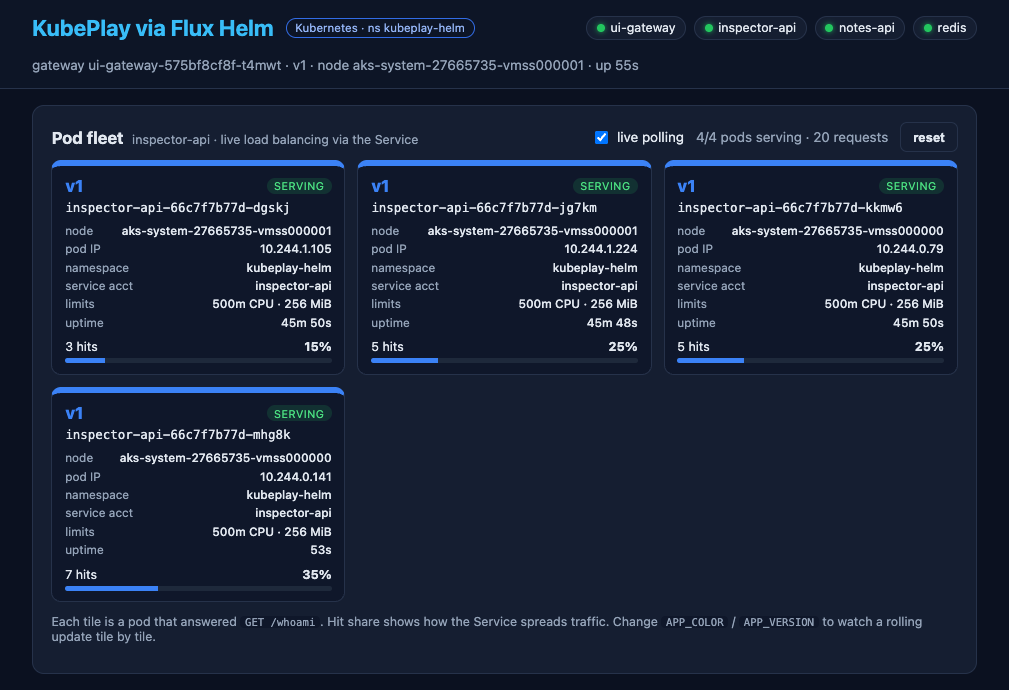
The fleet view discovers Pods by polling the Service, so it may take a few requests to show all four. Use the Deployment’s 4/4 readiness as the Kubernetes check rather than treating the UI counter as the desired replica count.
This test changed only the inline values. reconcileStrategy: Revision is what also allows chart-template changes in the chart’s own Git repository to produce a new chart artifact without bumping Chart.yaml each time; it is not what triggers a values-only upgrade.
Try It: Recover From Configuration Drift
A Git change is intentional. Drift is a change made directly in the cluster that disagrees with the desired state. In this setup, recovery depends on which object someone changes:
| Manual change | What restores it |
|---|---|
Edit the HelmRelease values with kubectl | kustomize-controller reapplies the HelmRelease manifest from Git. |
| Scale a Deployment or edit another Helm-managed workload | helm-controller corrects it when Helm drift detection is enabled. |
Use the disposable demo for these tests, not a production workload. The examples assume you completed the previous Git change and now have inspector.replicas: 4.
Change the HelmRelease Configuration Directly
The parent Kustomization already reconciles gitops/helm every minute. To see it restore a value without a new Git commit, temporarily change the live HelmRelease to one inspector replica:
kubectl patch helmrelease helm-demo-kubeplay -n kubeplay-helm \
  --type=merge -p '{"spec":{"values":{"inspector":{"replicas":1}}}}'

kubectl get helmrelease helm-demo-kubeplay -n kubeplay-helm \
  -o custom-columns=NAME:.metadata.name,REPLICAS:.spec.values.inspector.replicas \
  --watch
You should see the value return to 4 after the parent Kustomization reconciles. Stop the watch with Ctrl+C. Git still says four replicas, so the manual edit is overwritten even though there is no new commit.
The Helm controller may process the temporary value before Kustomize restores it, causing an upgrade to one replica followed by an upgrade back to four. Alternatively, Kustomize may restore the value before Helm acts. Do not assume the Deployment will visibly scale down just because the HelmRelease briefly changed.
This is configuration drift correction by Kustomize, not Helm workload drift detection.
Recover Helm-Managed Workloads
Directly running kubectl scale deployment/inspector-api changes a different object: the Deployment rendered by Helm. The parent Kustomization does not manage that Deployment directly, and a five-minute HelmRelease interval alone does not guarantee that manual workload changes are undone.
To enable recovery, I added this field under the existing spec in gitops/helm/helmrelease.yaml and pushed the change to Git:
spec:
  driftDetection:
    mode: enabled
The initial HelmRelease shown earlier predates this change; the current repository manifest includes it. If you are adapting an older manifest, add the field while keeping the existing chart settings and values.
After the commit, the configuration GitRepository stored revision 0c8d5f97900aea806f2948f2c72f5e84887e6c4e, and the parent Kustomization reported the same revision as applied. Verify that Git reconciliation applied the setting before testing:
kubectl get helmrelease helm-demo-kubeplay -n kubeplay-helm \
  -o custom-columns=MODE:.spec.driftDetection.mode,GENERATION:.metadata.generation,OBSERVED:.status.observedGeneration
In my cluster, the result was:
MODE      GENERATION   OBSERVED
enabled   3            3
The HelmRelease also reported Ready=True and Drifted=False with reason NoDriftDetected for generation 3. That confirms the setting was reconciled and no drift was detected at that point; it does not by itself demonstrate a correction.
Check that MODE is enabled and the observed generation matches the current generation. Then, on the disposable demo cluster, deliberately scale the live Deployment:
kubectl scale deployment/inspector-api -n kubeplay-helm --replicas=1
kubectl get deployment inspector-api -n kubeplay-helm --watch
With drift detection enabled, Helm’s controller compares the live resources with the rendered release manifest stored by Helm and corrects the difference. The Deployment should return to four replicas and eventually 4/4 ready. Allow for the HelmRelease’s five-minute reconciliation interval and Pod startup time; this is not an instant correction.
In my test on November 12, the Deployment controller recorded the scale-down from four to one at 13:03:27 UTC. The Helm controller detected and corrected the drift at 13:08:12 UTC, and my watch observed all four Pods ready by 13:08:18 UTC:
TIME (UTC)   DESIRED   CURRENT   READY   AVAILABLE
13:04:36     1         1         1       1
13:08:13     4         4         1       1
13:08:18     4         4         4       4
These are observations from this run, not a guaranteed recovery time. The relevant Helm controller log messages were:
13:08:12  detected changes in cluster state: removed: 0, changed: 1, excluded: 0
13:08:12  running 'correct cluster drift' action with timeout of 10m0s
13:08:13  release in-sync with desired state
The HelmRelease events identified the object that changed:
Warning  DriftDetected   Deployment/kubeplay-helm/inspector-api changed (0 additions, 1 changes, 0 removals)
Normal   DriftCorrected  Deployment/kubeplay-helm/inspector-api configured
The controller also logged a Drifted status-condition merge conflict immediately after the correction. It retried, reported the release in sync again, and the final HelmRelease conditions were Ready=True and Drifted=False (NoDriftDetected). The conflict did not prevent recovery in this run; investigate recurring errors rather than assuming every conflict is harmless.
For evidence of the detection and correction, inspect events and controller logs:
kubectl get events -n kubeplay-helm --sort-by=.lastTimestamp
kubectl logs -n flux-system deployment/helm-controller --since=15m
The Git commit can stay unchanged throughout this test: Flux is restoring the existing desired state, not deploying a new Git revision. For a permanent change, edit the HelmRelease values in Git instead.
Avoid competing with autoscalers. This demo disables the inspector HPA. If HPA or KEDA owns a workload’s replica count, configure drift-detection ignore rules for that field rather than having Flux reset the autoscaler’s changes.
mode: warnonly reports drift;mode: enabledalso corrects it. See the Flux Helm drift detection documentation for ignore rules and behavior.
This recovery applies to Kubernetes resources managed by Flux. It does not automatically revert portal edits to the Terraform-owned Azure Flux configuration; those need a reviewed Terraform plan and apply.
Removing Just This Lesson
Because the two Flux configurations are independent, I can remove the Helm lesson while leaving Podinfo and the cluster running. First stop the release from reconciling by removing helmrelease.yaml from gitops/helm/kustomization.yaml and publishing that change, then wait for the uninstall:
kubectl wait --for=delete helmrelease/helm-demo-kubeplay -n kubeplay-helm --timeout=600sOnce that succeeds, remove the Azure Flux configuration itself:
export ARM_SUBSCRIPTION_ID="$(az account show --query id --output tsv)"
terraform -chdir=terraform plan -var='enabled_demos=["kustomize"]'
terraform -chdir=terraform apply -var='enabled_demos=["kustomize"]'
Review the plan before applying — you want to see only the Helm configuration being removed. Garbage collection then removes the kubeplay-helm namespace along with everything in it, including any demo data, so check for retained persistent volumes afterward if the chart created any. The Kustomize foundation and the managed extension are untouched.
I deliberately did not use cleanup.sh for this: it destroys the whole cluster, which is the wrong tool for removing one lesson while keeping the others.
When It Does Not Work
A few failure modes were specific to the Helm path, on top of the general checklist from the first post:
| Symptom | What to check |
|---|---|
secrets is forbidden during install | The Role bound to serviceAccountName does not grant access to Secrets, or serviceAccountName was left unset so it fell back to the wrong namespace’s flux-applier. |
HelmChart not ready | The GitRepository’s ignore block may be excluding the chart path, or chart.spec.chart does not match the path inside the source. |
| Install succeeds, chart’s extra resources fail | The Role’s resource list has not been kept in sync with everything the chart actually creates. |
| Upgrade never triggers after a chart-only change | Confirm reconcileStrategy: Revision is set, and that the GitRepository picked up the new commit (kubectl describe gitrepository helm-demo-chart -n kubeplay-helm). |
| A manually scaled Helm Deployment stays changed | Enable spec.driftDetection.mode: enabled through Git, check for ignore rules, and inspect Helm controller events for correction failures. |
helm-demo-config compliant, but cluster-config affected | It should not be — they are independent. If you see cross-impact, check for a shared namespace or object name between the two Git paths. |
These commands usually explain what happened:
kubectl describe gitrepository helm-demo-chart -n kubeplay-helm
kubectl describe helmrelease helm-demo-kubeplay -n kubeplay-helm
kubectl logs -n flux-system deployment/helm-controller --tail=100
kubectl logs -n flux-system deployment/source-controller --tail=100
What’s Next
This post added a second, independent lesson to the same cluster: a Helm chart deployed through Git, with its own RBAC so the managed extension’s Helm controller can install it safely. The Kustomize demo from the first post kept running the whole time, unaffected.
A natural next lesson is swapping the Git-based chart source for a published HelmRepository or an OCI registry chart, and seeing what changes (and what does not) compared with what is in this post. I will cover that, along with namespace-scoped Flux configurations for multi-team clusters, in later posts in this series.