

I am learning Flux at the moment. So far I have only used the open source version, installed with flux bootstrap, mostly to understand how the pieces fit together. I have not run it in production.
AKS also offers Flux as a managed cluster extension, and I wanted to know how that compares. Is it the same Flux with a different installer, or does it change how you work with it? The best way to find out is to build it, so I am turning that into a series. Over the next posts I will go through Flux concepts one at a time on an AKS cluster that uses the extension: Helm releases, dependencies between Kustomizations, multiple environments, and so on, noting where it differs from what I saw with OSS Flux.
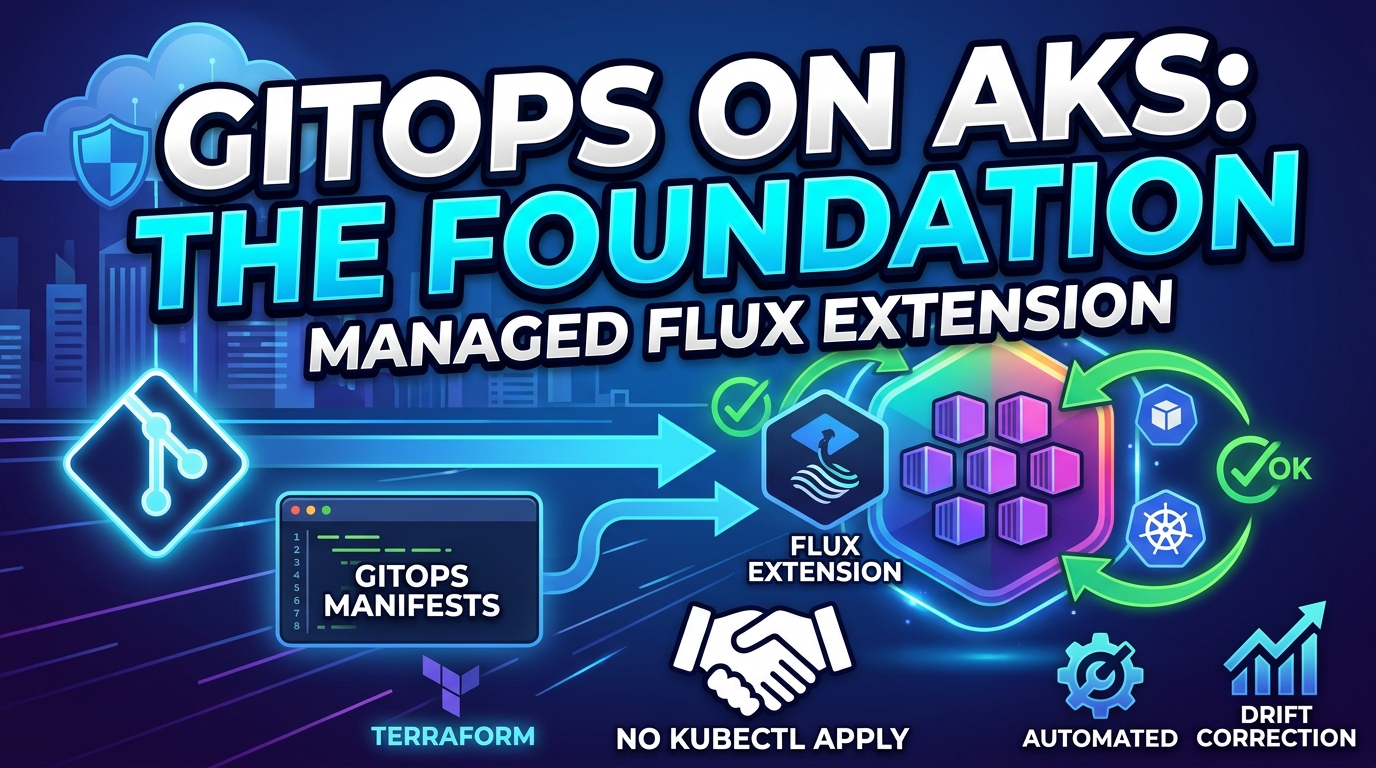
This post is the foundation: a cluster with the extension installed, connected to a Git repository, and a first look at what “Flux is reconciling” means in practice. Everything is in my Code-Snippets repository. I explain the design and the important commands here, and the repo has the exact files.
Coming from OSS Flux? I wrote about the self-managed route in Bootstrapping Flux on AKS: Connect a Git Repository with GitRepository and Kustomization CRDs, which uses
flux bootstrap. This series uses the Azure-managed extension instead, and the next section explains the difference.
Two Ways to Run Flux on AKS
Self-managed Flux. You install the Flux CLI, run flux bootstrap, and Flux commits its own manifests into your Git repository. You own the upgrades, you choose the version, and you have full access to everything Flux can do.
The AKS Flux extension (microsoft.flux). Azure installs the Flux controllers as a cluster extension and keeps them updated on a release train (Stable, in my setup). You describe what to sync as an Azure resource, a “Flux configuration”, and Azure’s agents create the Flux objects in the cluster for you.
I do not think either one wins in every case. These are the things that stood out to me about the extension, and I will keep testing them as the series goes on:
- Installing and removing Flux becomes part of your infrastructure code instead of a separate step on somebody’s laptop.
- The extension is managed and upgraded for you, so there is less Flux version housekeeping.
- The Azure portal shows the compliance state of every configuration, which is nice when other people need to see what is going on without learning
kubectl.
The trade-off is that you describe your sources through Azure resources (or the az k8s-configuration flux CLI) rather than hand-writing the Flux YAML. One consequence is worth knowing up front:
Do not run
flux bootstrapon a cluster that already has the extension. Both would try to manage the Flux controllers and CRDs influx-system, so pick one approach per cluster. I have not tested what happens if you mix them, and I do not plan to.
What We Are Building
The demo creates:
- A small AKS cluster (two nodes, Azure CNI Overlay with Cilium, system-assigned managed identity, Free control-plane tier).
- The managed Flux extension, installed into the
flux-systemnamespace. - A Flux configuration called
cluster-configthat points at a public Git repository and path. - An optional sample app (Podinfo) so there is something to look at.
Terraform owns the Azure resources. Flux owns everything that lives inside the Git path. The two do not overlap, and that separation is the whole point:
You ── commit ──> Git repository
                      ▲
                      │ outbound HTTPS pull (every 60s)
                      │
        ┌─────────────┴──────────────── AKS ────────────────┐
        │  flux-system:    source-controller                 │
        │                  kustomize-controller              │
        │                  helm-controller                   │
        │                  notification-controller           │
        │                  Azure Flux configuration agents   │
        │                                                    │
        │  cluster-config: GitRepository                     │
        │                  Flux Kustomization                │
        │                  ("cluster-config-apps")           │
        │                                                    │
        │  your app namespaces: whatever the Git path holds  │
        └────────────────────────────────────────────────────┘
Notice the arrow direction. Nothing pushes into the cluster. Flux reaches out to Git over outbound HTTPS, so you do not need to open an inbound path from GitHub to your cluster or hand your pipeline cluster credentials.
Prerequisites
- Azure CLI, Terraform 1.6 or later,
kubectl,jq, and Git. - An Azure subscription where you can create AKS and
Microsoft.KubernetesConfigurationresources. Resource provider registration needs subscription-level permissions, so ask an admin if you cannot do it yourself. - Quota for two
Standard_D2s_v6nodes in your region. Change the VM size or region in the variables if that does not work for you. - A public Git repository with a published branch. Flux cannot see uncommitted files or a branch that only exists on your laptop.
The Terraform, Piece by Piece
I will skip the resource group and the cluster itself, since they are standard. If you want the full file, it is in the repo. The interesting part is the two resources that make Flux happen.
1. Install the extension
resource "azurerm_kubernetes_cluster_extension" "flux" {
  name              = "flux"
  cluster_id        = azurerm_kubernetes_cluster.this.id
  extension_type    = "microsoft.flux"
  release_train     = "Stable"
  release_namespace = "flux-system"
}
That is it. No Flux CLI, no bootstrap. I did not pin a version, so Azure’s auto-upgrade behavior applies. For a demo that is fine, and for production you may want more control.
2. Tell Flux what to sync
The extension on its own does not know about any repository. It just runs the controllers. You also need a Flux configuration:
resource "azurerm_kubernetes_flux_configuration" "this" {
  name                              = "cluster-config"
  cluster_id                        = azurerm_kubernetes_cluster.this.id
  namespace                         = "cluster-config"
  scope                             = "cluster"
  continuous_reconciliation_enabled = true

  git_repository {
    url                      = var.git_repository_url
    reference_type           = "branch"
    reference_value          = var.git_branch
    sync_interval_in_seconds = 60
    timeout_in_seconds       = 120
  }

  kustomizations {
    name                       = "apps"
    path                       = var.gitops_path
    garbage_collection_enabled = true
    sync_interval_in_seconds   = 60
    retry_interval_in_seconds  = 30
    timeout_in_seconds         = 300
  }

  depends_on = [azurerm_kubernetes_cluster_extension.flux]
}
A few things I want to point out, because they are the settings that matter day to day:
sync_interval_in_seconds = 60on the repository is how often Flux checks Git for new commits.pathis relative to the repository root, not your local working directory. Getting this wrong is an easy way to end up with a “path not found” error.garbage_collection_enabled = trueturns on pruning. If you delete a manifest from Git, Flux deletes the object from the cluster. That is exactly what you want from GitOps, and also exactly why you should not experiment with deleting a Namespace in a cluster you care about.scope = "cluster"lets the configuration manage resources in any namespace. That is convenient, but it is a powerful permission, so only trusted people should be able to merge to the tracked branch. In a later post I want to look at namespace-scoped configurations for multi-team clusters.depends_onmakes sure the extension exists before the configuration is created, and Terraform also destroys them in the reverse order.
A confusing detail: two things called “Kustomization”
When you start, it is easy to mix these up:
| What | Where it lives | Purpose |
|---|---|---|
kustomization.yaml | In your Git repository | A Kustomize build file listing resources and overlays. |
Flux Kustomization | A Kubernetes object in the cluster | Tells Flux which path to build and apply, and how often. |
Same word, completely different things. In this setup the Flux Kustomization is generated for you from the kustomizations block above. You never write that YAML by hand. The kustomization.yaml files in the repo are plain Kustomize and just describe what to build.
The Sample App in Git
For the demo I use Podinfo, a tiny Go app made for this kind of thing. The gitops folder looks like this:
gitops/
  kustomization.yaml     # includes infra and apps
  infra/
    kustomization.yaml
    namespace.yaml       # the flux-demo namespace
  apps/
    kustomization.yaml   # sets the namespace and a replica override
    deployment.yaml
    service.yaml
The top-level kustomization.yaml includes both infra and apps, so the single cluster-config-apps Flux Kustomization applies the namespace and the workload together. That keeps this first post simple. Splitting infrastructure from applications, with dependencies between the two, is a good topic for the next post.
Two small details in the Deployment are worth a mention. First, I run it hardened (non-root, read-only root filesystem, dropped capabilities, resource limits, probes), and the namespace enforces the restricted Pod Security level. Second, the Deployment says replicas: 2, but apps/kustomization.yaml overrides it to 3:
apiVersion: kustomize.config.k8s.io/v1beta1
kind: Kustomization
namespace: flux-demo
resources:
  - deployment.yaml
  - service.yaml
replicas:
  - name: podinfo
    count: 3
I left that in deliberately. When you test the Git-change flow later, remember that the number to edit is in the Kustomize file, not in deployment.yaml.
Deploy It
Because Flux can only pull from a published branch, the first decision is where your manifests live. Two options:
- Use my repository directly. It is public, so you can point at it and just watch Flux do its thing.
- Fork it (or copy the
gitopsfolder into your own repo). You need this if you want to push changes, which is the interesting part, so I recommend it.
Clone the repo, sign in, and copy the example variables file:
cd AKS-Flux-Extension
az login
az account set --subscription "<your-subscription-name>"
cp terraform/terraform.tfvars.example terraform/terraform.tfvars
Edit terraform/terraform.tfvars. For a fork of Code-Snippets it looks like this:
git_repository_url = "https://github.com/YOUR-ACCOUNT/Code-Snippets.git"
git_branch         = "main"
gitops_path        = "./AKS-Flux-Extension/gitops"
If you copy the gitops folder into your own repo instead, use gitops_path = "./gitops". Point at the gitops root rather than just gitops/apps, otherwise Flux will not create the namespace.
Then run the script:
bash deploy.sh
export KUBECONFIG="$PWD/kubeconfig"
The script registers the resource providers, formats and validates the Terraform, applies it, downloads a dedicated kubeconfig into the folder (gitignored), and prints the Flux objects.
Heads up:
deploy.shrunsterraform apply -auto-approve. It will not show you the plan first. Read your variables before you run it, and if you prefer to see the plan, run the Terraform commands yourself.
The apply itself takes several minutes. Also, a successful terraform apply only proves Azure created the resources. It does not prove Flux managed to pull your repository and apply the manifests. That is a separate question, and we will check it next.
Check That Flux Is Actually Working
Install the Azure CLI extensions for inspecting extensions and configurations:
az extension add --name k8s-extension --upgrade
az extension add --name k8s-configuration --upgrade

RESOURCE_GROUP="$(terraform -chdir=terraform output -raw resource_group_name)"
CLUSTER_NAME="$(terraform -chdir=terraform output -raw cluster_name)"

az k8s-extension show --resource-group "$RESOURCE_GROUP" \
  --cluster-name "$CLUSTER_NAME" --cluster-type managedClusters --name flux

az k8s-configuration flux show --resource-group "$RESOURCE_GROUP" \
  --cluster-name "$CLUSTER_NAME" --cluster-type managedClusters --name cluster-config
You want the extension in a Succeeded provisioning state and the configuration to become Compliant. It may show non-compliant for a short time at first. Give it a minute or two before you worry.
Then look from inside the cluster:
kubectl get pods -n flux-system
kubectl get gitrepositories.source.toolkit.fluxcd.io -n cluster-config
kubectl get kustomizations.kustomize.toolkit.fluxcd.io -n cluster-config
Both the GitRepository and the Flux Kustomization should report READY=True. Notice the name of the Kustomization: I declared it as apps in Terraform, but the object in the cluster is called cluster-config-apps. Azure builds the name from the configuration name plus the Kustomization name.
If you prefer clicking, open the AKS resource in the Azure portal, go to GitOps, and select cluster-config. You will see the same compliance information there. That is a nice extra compared with OSS Flux, where you would need kubectl or the Flux CLI for the same view.
What Azure generated for you
I said earlier that you never write the Flux YAML yourself in this setup. Here is what Azure actually created from the Terraform. Use kubectl describe for a readable summary with events, or -o yaml for the full object:
kubectl describe gitrepositories.source.toolkit.fluxcd.io -n cluster-config
kubectl describe kustomizations.kustomize.toolkit.fluxcd.io -n cluster-config

kubectl get gitrepositories.source.toolkit.fluxcd.io cluster-config -n cluster-config -o yaml
kubectl get kustomizations.kustomize.toolkit.fluxcd.io cluster-config-apps -n cluster-config -o yaml
This is the GitRepository from my demo cluster, which tracks the main branch of my Code-Snippets repository. I removed a few noisy fields (UIDs, resource versions, and timestamps), and you will see the values from your own terraform.tfvars:
apiVersion: source.toolkit.fluxcd.io/v1
kind: GitRepository
metadata:
  name: cluster-config
  namespace: cluster-config
  labels:
    clusterconfig.azure.com/is-managed: "true"
    clusterconfig.azure.com/name: cluster-config
    clusterconfig.azure.com/namespace: cluster-config
  ownerReferences:
  - apiVersion: clusterconfig.azure.com/v1alpha1
    blockOwnerDeletion: true
    controller: true
    kind: FluxConfig
    name: cluster-config
spec:
  interval: 1m0s
  ref:
    branch: main
  timeout: 2m0s
  url: https://github.com/kasunsjc/Code-Snippets.git
status:
  artifact:
    revision: main@sha1:c2eb9b3652060eee334b67b2f72356e1ba5868b7
    url: http://source-controller.flux-system.svc.cluster.local./gitrepository/cluster-config/cluster-config/c2eb9b3652060eee334b67b2f72356e1ba5868b7.tar.gz
  conditions:
  - message: stored artifact for revision 'main@sha1:c2eb9b3652060eee334b67b2f72356e1ba5868b7'
    reason: Succeeded
    status: "True"
    type: Ready
  - reason: Succeeded
    status: "True"
    type: ArtifactInStorage
Mapping it back to Terraform is easy: interval is sync_interval_in_seconds = 60, timeout is timeout_in_seconds = 120, and ref.branch and url come from git_repository. The status.artifact.revision is the branch plus the exact commit SHA that Flux fetched, which is how you confirm the cluster has the commit you pushed.
The two things you will not find in plain OSS Flux are the clusterconfig.azure.com labels and the ownerReferences. The owner is a FluxConfig object, which is Azure’s own custom resource. That tells you who is in charge: these objects are generated from the Azure configuration, so make changes through Terraform or the Azure CLI rather than editing them with kubectl.
And this is the Flux Kustomization:
apiVersion: kustomize.toolkit.fluxcd.io/v1
kind: Kustomization
metadata:
  name: cluster-config-apps
  namespace: cluster-config
  labels:
    clusterconfig.azure.com/is-managed: "true"
    clusterconfig.azure.com/name: cluster-config
    clusterconfig.azure.com/namespace: cluster-config
  ownerReferences:
  - apiVersion: clusterconfig.azure.com/v1alpha1
    blockOwnerDeletion: true
    controller: true
    kind: FluxConfig
    name: cluster-config
spec:
  force: false
  interval: 1m0s
  patches:
  - patch: |2

      - op:   add
        path: /spec/chart/spec/sourceRef
        value: {"name": "cluster-config", "namespace": "cluster-config", "kind": "GitRepository"}
    target:
      annotationSelector: clusterconfig.azure.com/use-managed-source=true
      group: helm.toolkit.fluxcd.io
      kind: HelmRelease
  - patch: |2

      - op:   add
        path: /spec/sourceRef
        value: {"name": "cluster-config", "namespace": "cluster-config", "kind": "GitRepository"}
    target:
      annotationSelector: clusterconfig.azure.com/use-managed-source=true
      group: kustomize.toolkit.fluxcd.io
      kind: Kustomization
  path: ./AKS-Flux-Extension/gitops
  postBuild: {}
  prune: true
  retryInterval: 30s
  serviceAccountName: flux-applier
  sourceRef:
    kind: GitRepository
    name: cluster-config
    namespace: cluster-config
  timeout: 5m0s
  wait: true
status:
  conditions:
  - message: 'Applied revision: main@sha1:c2eb9b3652060eee334b67b2f72356e1ba5868b7'
    reason: ReconciliationSucceeded
    status: "True"
    type: Ready
  - message: Health check passed in 71.838908ms
    reason: Succeeded
    status: "True"
    type: Healthy
  inventory:
    entries:
    - id: _flux-demo__Namespace
      v: v1
    - id: flux-demo_podinfo__Service
      v: v1
    - id: flux-demo_podinfo_apps_Deployment
      v: v1
  lastAppliedRevision: main@sha1:c2eb9b3652060eee334b67b2f72356e1ba5868b7
A few things stand out here:
path,interval,retryInterval,timeoutandprunemap straight to thekustomizationsblock in Terraform (prune: trueisgarbage_collection_enabled = true).wait: truemeans Flux waits for the applied resources to become healthy, which is where theHealthycondition comes from. AReady=TrueKustomization therefore tells you more than “the YAML was applied”.serviceAccountName: flux-appliermeans Flux applies the manifests as that service account rather than as itself. Withscope = "cluster", I checked and this service account is bound to thecluster-adminClusterRole (flux-applier-binding). That is what makes cluster scope powerful, and it is why I wrote earlier that only trusted people should be able to merge to the tracked branch.status.inventoryis the list of objects Flux owns and will prune if they disappear from Git. For the sample app that is the namespace, the Service, and the Deployment.- The two
patchesare added by Azure, not by me. From reading them, they redirect aHelmReleaseor a nested FluxKustomizationthat carries theclusterconfig.azure.com/use-managed-source=trueannotation to this same managedGitRepository. I expect that to matter when we get to Helm, so I will come back to it.
Check the app
Now check the workload itself:
kubectl wait --for=create deployment/podinfo -n flux-demo --timeout=600s
kubectl rollout status deployment/podinfo -n flux-demo --timeout=300s
kubectl port-forward -n flux-demo service/podinfo 9898:9898
Open http://localhost:9898 while the port-forward is running:

You can also use curl http://localhost:9898/ | jq from a second terminal and you will get JSON with the same message.
Blank page in Brave? The Podinfo UI loads Vue and Vuetify from a CDN, and Brave Shields can block those scripts. That is a browser issue and not a Flux or Kubernetes problem. Allow the scripts for localhost, or try another browser.
At this point we did something worth stopping to appreciate: we never ran kubectl apply for the app. The namespace, Deployment, and Service all came from Git.
Try It: A Change Through Git
Time to see GitOps work. In your fork, change the message or the replica count, commit, and push to the same branch Terraform points at.
For example, in gitops/apps/kustomization.yaml, change count: 3 to count: 4, then push:
git add gitops/apps/kustomization.yaml
git commit -m "Scale podinfo to 4 replicas"
git push
Then watch the cluster:
kubectl get deployment podinfo -n flux-demo --watchWithin a few reconciliation intervals the Deployment should move to 4 replicas. There is no second Terraform run, no pipeline, and no kubectl. If you track main and normally work through pull requests, remember that Flux only sees the change once it is merged.
If you want to be sure that the cluster has the commit you expect, look at the revision reported on the Flux Kustomization:
kubectl describe kustomizations.kustomize.toolkit.fluxcd.io -n cluster-configTry It: Drift Correction
This is the part that changes how you think about the cluster. Make a manual change that disagrees with Git:
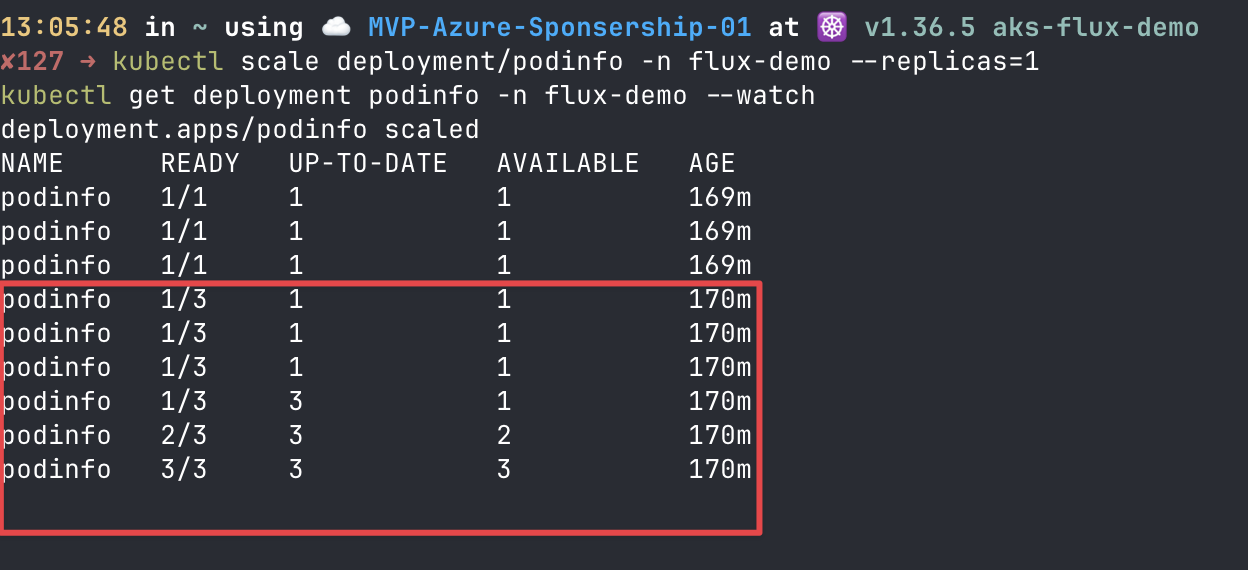
kubectl scale deployment/podinfo -n flux-demo --replicas=1
kubectl get deployment podinfo -n flux-demo --watch
Flux notices that the live state no longer matches Git and puts it back, usually within a few intervals. The cluster is not the source of truth, Git is. If you want a permanent change, commit it.
Here is my terminal during the test. The Deployment drops to 1 replica right after the kubectl scale, and then goes back to 3 on its own (the red box). I did not touch anything between those two states:
What the logs show
The watch tells you that Flux fixed it. The controller logs tell you what Flux did and when. Drift correction is done by the kustomize-controller, so look there. Each reconciliation logs the result of a server-side apply for every object, and I filter on configured because anything Flux actually had to change shows up with that word. Objects that already match Git are reported as unchanged:
kubectl logs -n flux-system deployment/kustomize-controller --since=30m | grep '"configured"'This is the full sequence from my cluster, with the repeated controller fields removed to make it readable. The scale command ran at 12:05:54 UTC (from the Kubernetes event timestamps), between two normal reconciliations:
{"ts":"2026-10-31T12:05:19.714Z","msg":"server-side apply completed","Kustomization":{"name":"cluster-config-apps","namespace":"cluster-config"},"output":{"Deployment/flux-demo/podinfo":"unchanged","Namespace/flux-demo":"unchanged","Service/flux-demo/podinfo":"unchanged"},"revision":"main@sha1:c2eb9b3652060eee334b67b2f72356e1ba5868b7"}
{"ts":"2026-10-31T12:05:19.846Z","msg":"Reconciliation finished in 335.475433ms, next run in 1m0s"}

{"ts":"2026-10-31T12:06:18.239Z","msg":"server-side apply completed","Kustomization":{"name":"cluster-config-apps","namespace":"cluster-config"},"output":{"Deployment/flux-demo/podinfo":"configured","Namespace/flux-demo":"unchanged","Service/flux-demo/podinfo":"unchanged"},"revision":"main@sha1:c2eb9b3652060eee334b67b2f72356e1ba5868b7"}
{"ts":"2026-10-31T12:06:23.420Z","msg":"Reconciliation finished in 5.418177543s, next run in 1m0s"}

{"ts":"2026-10-31T12:07:25.699Z","msg":"server-side apply completed","Kustomization":{"name":"cluster-config-apps","namespace":"cluster-config"},"output":{"Deployment/flux-demo/podinfo":"unchanged","Namespace/flux-demo":"unchanged","Service/flux-demo/podinfo":"unchanged"},"revision":"main@sha1:c2eb9b3652060eee334b67b2f72356e1ba5868b7"}
{"ts":"2026-10-31T12:07:25.823Z","msg":"Reconciliation finished in 414.151768ms, next run in 1m0s"}
Read it as three steps:
- 12:05:19: everything is
unchanged. This is the normal heartbeat. Flux applies the whole path every minute, even when nothing is wrong. - 12:06:18: the Deployment is
configured. Flux compared the live object with Git, found thatreplicaswas 1 instead of 3, and applied Git’s version. The Namespace and Service were not touched. Note that the revision is the same commit as before. Nothing changed in Git, so this is drift correction and not a new deployment. - 12:07:25: back to
unchanged, because the cluster matches Git again.
Two details I noticed:
- The reconciliation took 5.4 seconds instead of the usual 300 to 400 milliseconds. My guess is that this is
wait: trueon the Kustomization (see the YAML above): Flux waits for the Deployment to become healthy again before it reports success. - It was not instant. The scale happened at 12:05:54 and the fix landed at 12:06:18, about 24 seconds later. With a 60-second interval, the worst case is a bit over a minute.
Flux also records this as Kubernetes events, which is handy if you do not have access to the controller logs:
kubectl get events -n cluster-config --sort-by=.lastTimestamp
kubectl get events -n flux-demo --sort-by=.lastTimestamp
# namespace: cluster-config
Normal Progressing kustomization/cluster-config-apps Deployment/flux-demo/podinfo configured
# namespace: flux-demo
Normal ScalingReplicaSet deployment/podinfo Scaled up replica set podinfo-6d884f55cc from 1 to 3
Normal SuccessfulCreate replicaset/podinfo-6d884f55cc Created pod: podinfo-6d884f55cc-hwjnr
Normal SuccessfulCreate replicaset/podinfo-6d884f55cc Created pod: podinfo-6d884f55cc-rs856
Warning Unhealthy pod/podinfo-6d884f55cc-hwjnr Readiness probe failed: ... connect: connection refusedThe first event is Flux (Progressing ... configured) and the rest are Kubernetes reacting to it. The Unhealthy warnings are the readiness probe firing while the two new pods start, and they stop once the pods are ready. They are expected here, and not a sign that the correction failed.
Rolling back works the same way. Revert the commit, push, and Flux reconciles to the reverted state. Your rollback has the same audit trail as any other change.
A word of caution: only try this on a Deployment that is not controlled by an HPA or KEDA, or the two controllers will argue with each other. We will get to that interaction in a later post.
And since pruning is on, remember that deleting something from Git deletes it from the cluster. That is great for tidy-ups and dangerous for namespaces, because removing a Namespace removes everything in it. Use disposable resources when you experiment.
When It Does Not Work
Terraform being green and the app being missing is the most common situation, so here is a checklist to start from:
| Symptom | What to check |
|---|---|
| Source is not ready | The repo URL, that the branch is actually published, and outbound connectivity to Git. |
| Path not found | gitops_path is relative to the repository root. |
| Namespace or prerequisite missing | Include it in the Git path, or create it before reconciliation. |
| Pods are Pending | Node capacity, VM quota, and scheduling events. |
ImagePullBackOff | Registry connectivity, the image tag, and pull credentials. |
| Non-compliant in Azure at first | Wait a couple of minutes, then check the source and Kustomization errors. |
These commands usually tell you the story:
kubectl describe gitrepositories.source.toolkit.fluxcd.io -n cluster-config
kubectl describe kustomizations.kustomize.toolkit.fluxcd.io -n cluster-config
kubectl logs -n flux-system deployment/source-controller --tail=100
kubectl logs -n flux-system deployment/kustomize-controller --tail=100
kubectl get events -n flux-demo --sort-by=.lastTimestamp
If your network is locked down, remember that the Azure agents need outbound HTTPS to management.azure.com, <region>.dp.kubernetesconfiguration.azure.com, login.microsoftonline.com, and mcr.microsoft.com, in addition to the normal AKS egress requirements.
Production Notes
This is a learning environment, not a landing zone. Before you copy the pattern, consider at least these differences:
- A private or restricted API server and Entra ID with Azure RBAC. The demo uses a public API and local kubeconfig to keep things simple.
- Private Git with proper authentication. Public repos need no credentials, which is why the demo works at all. Private repos need extra configuration. Never put tokens in URLs, manifests, or committed
tfvars. - Protected branches and reviews. With cluster scope, whoever can merge to the tracked branch can change anything in the cluster.
- Pinned image digests. Image automation is not enabled here, so version changes must be committed to Git. That is a sensible default.
- Namespace-scoped configurations for teams that share a cluster.
- A remote Terraform backend. The local state file is sensitive. It is gitignored, but it is still sensitive.
Clean Up
The control plane is on the Free tier, but the worker VMs and disks still cost money. When you are done:
bash cleanup.sh
unset KUBECONFIG
You will be asked to type destroy. Terraform removes the Flux configuration first, then the extension, then the cluster. If your Git path creates anything outside the demo resource groups, like public IPs or retained disks, check for leftovers afterwards, because Terraform does not know about those.
What Is Next
We now have a repeatable foundation: a cluster, managed Flux, a Git source, and proof that changes and drift both go through Git. In the next posts I will build on this cluster and cover:
- Deploying applications with Helm using
HelmRepositoryandHelmRelease. - Splitting infrastructure and apps and ordering them with dependencies.
- Handling multiple environments from one repository.
- Other Flux concepts that come up once you run this for real.
I will update this list as the series takes shape. If there is a Flux topic on AKS you would like me to cover, let me know.