
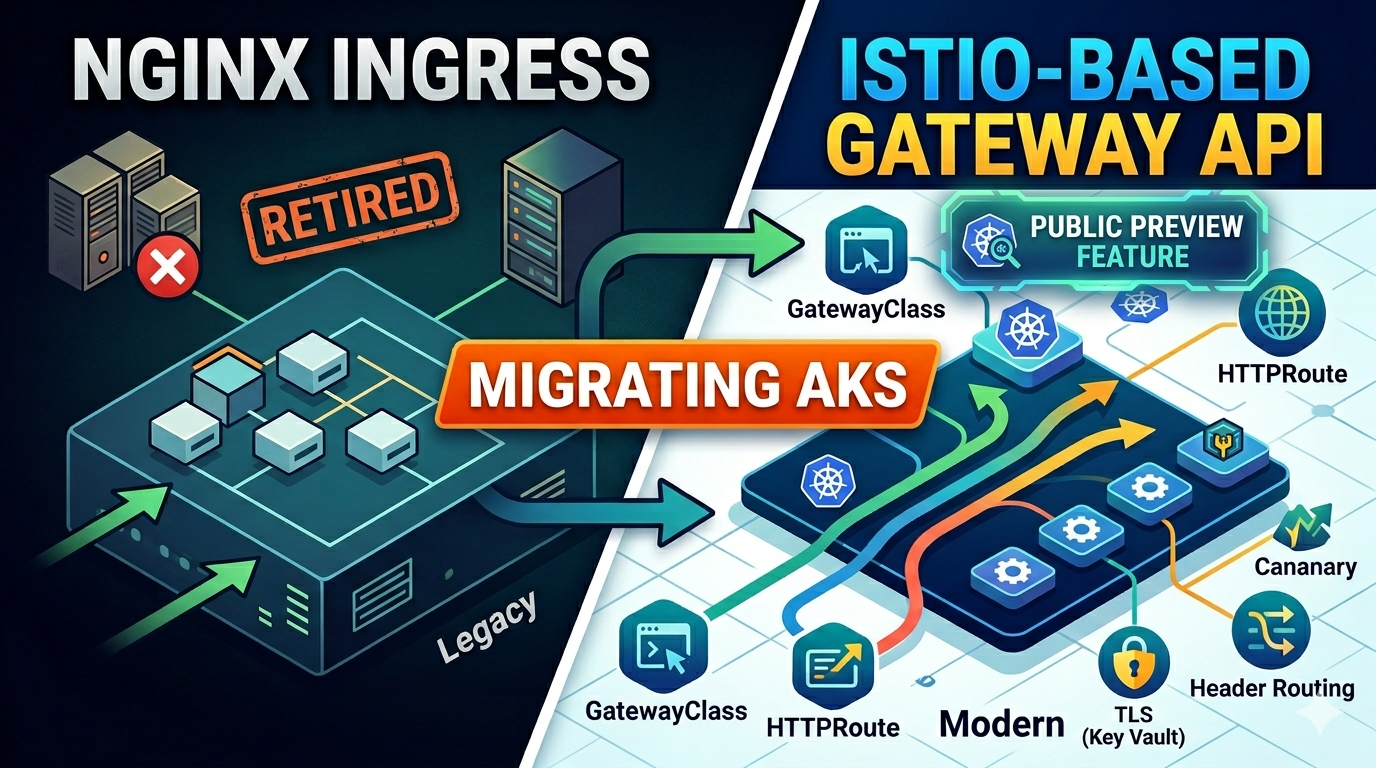

For most of my AKS life I’ve been using NGINX as my ingress controller. It worked, I knew it, I stopped thinking about it. Then the Ingress-NGINX project was officially retired earlier this year. Patches keep flowing until November 2026, but the writing’s on the wall.
So I went looking at what AKS recommends instead, which turns out to be the App Routing add-on with Istio-based Gateway API support — announced back in March 2026. My first reaction when I saw “Istio-based” was to back away slowly. The last thing I wanted was to run a full service mesh just to terminate TLS and route to a couple of services. But after spending a weekend with it, I changed my mind. It’s not what the name suggests.
This post is everything I figured out while getting it running: what the Gateway API really is, where Istio actually shows up (and where it doesn’t), and the bits of the setup that cost me time so they don’t cost you any.
ℹ️ Now GA. The App Routing add-on with Istio-based Gateway API support went generally available in the AKS 2026-04-28 release, after launching in public preview in March 2026. It’s supported for production, though a few capabilities (notably automated DNS and TLS certificate management) aren’t there yet — see What’s Still Missing below.
A Quick Word on Why Ingress Was Always Awkward
Ingress did the basic job — get traffic into a cluster — and it did it long enough that most of us stopped questioning it. But if you’ve ever had to do anything more interesting than “hostname X goes to service Y”, you know the rough edges.
Wanted canary routing, rate limits, custom headers? You ended up writing annotations like nginx.ingress.kubernetes.io/canary-weight, which only mean something to NGINX. Switch controllers and your config is suddenly junk. Worse, those annotations were never part of the Kubernetes API — they were a side door that every controller carved out differently.
The ownership story was also strange. Whoever ran the ingress controller effectively owned every inbound route in the cluster, because there was no clean way to let a dev team manage their own routing without handing them keys to the shared config. Most places I’ve worked solved this by funnelling every change through the platform team, which gets old fast.
The Kubernetes folks spent a few years working on a replacement, and the result is the Gateway API. It’s worth a minute on the model before any commands, because once you see what they did, the rest of this post makes a lot more sense.
How the Gateway API Thinks About Routing
The big change is mostly about who owns what. With Ingress, the platform people, the operators, and the app developers all ended up editing the same resource, which is exactly as messy as it sounds. Gateway API breaks that into three objects, one per role:
┌─────────────────────────────────────────────────────────┐
│  GatewayClass  — "What kind of gateway infrastructure?" │
│  (Managed by the Platform/Infra team)                   │
│  Example: approuting-istio                               │
└──────────────────────────┬──────────────────────────────┘
                           │
┌──────────────────────────▼──────────────────────────────┐
│  Gateway  — "Spin up an actual gateway instance"        │
│  (Managed by Cluster Operators)                         │
│  Example: my-app-gateway listening on port 443          │
└────────────┬─────────────────────────┬──────────────────┘
             │                         │
┌────────────▼──────────┐  ┌───────────▼──────────────────┐
│  HTTPRoute            │  │  HTTPRoute                   │
│  (App Developers)     │  │  (App Developers)            │
│  /api/* → service-a   │  │  /web/* → service-b          │
└───────────────────────┘  └──────────────────────────────┘
GatewayClass is basically the “what kind of gateway” label. AKS ships one called approuting-istio the moment you enable the add-on — you don’t create it, it’s just there.
Gateway is the thing that actually runs. Apply one Gateway manifest pointing at approuting-istio and AKS spins up the Envoy proxy deployment, an Azure Load Balancer with a public IP, an HPA, and a PodDisruptionBudget. All of that from a single YAML file, which still feels a bit magic the first time you watch it happen.
HTTPRoute is the bit developers care about. Each service team writes their own HTTPRoute and attaches it to a Gateway, and nobody steps on anyone else’s config. You can have ten HTTPRoutes owned by ten different teams hanging off one Gateway — and that’s the part that finally fixes the old Ingress ownership mess.
The Istio Part (And Why It Isn’t What You Think)
So about the “Istio” in the name. My head went straight to sidecars in every pod, mTLS everywhere, a fat istiod running the show. That’s not what this is, and I think the naming is doing the feature a disservice.
AKS actually has two completely separate Istio-related features. They look similar from a distance and they’re easy to mix up:
| App Routing (Istio) — this post | Istio Service Mesh Add-on | |
|---|---|---|
| What it does | Manages ingress traffic only | Full east-west + north-south mesh |
| Sidecar injection | None | Enabled cluster-wide |
| Istio CRDs installed | No | Yes |
| GatewayClass name | approuting-istio | istio |
| Complexity | Low | High |
| Good for | ”I just need modern ingress" | "I need mTLS between services and observability” |
| Can coexist on same cluster? | No | No |
App Routing (Istio) gives you a stripped-down istiod whose entire job is to manage the Envoy pods that act as your gateway. Your application pods don’t know about Istio at all. No sidecars get injected. No mesh-y things happen to your workloads. You also don’t need to learn any Istio concepts — VirtualService, DestinationRule, none of it. You write Gateway and HTTPRoute like any other Gateway API user.
The way I think about it now: it’s just “Envoy as a managed gateway”, and the Istio control plane is an implementation detail. Honestly, if Microsoft renamed it tomorrow I think uptake would jump.
How the Pieces Connect
Once it’s all running, here’s what the wiring looks like end to end:
┌──────────────────────────────────────────────────────────────┐
│                     Azure Key Vault                          │
│   ┌──────────────────────────────────────────────────────┐   │
│   │  SSL/TLS Certificate (PFX)                           │   │
│   │  - Subject: *.yourdomain.com                         │   │
│   │  - Self-signed (or bring your own CA certificate)    │   │
│   └────────────────────┬─────────────────────────────────┘   │
└────────────────────────┼──────────────────────────────────────┘
                         │
                         │  CSI Secrets Store Driver
                         │  (Polls Key Vault every 2 min, syncs to K8s Secret)
                         ▼
┌──────────────────────────────────────────────────────────────┐
│           Kubernetes Secret: gateway-tls-secret              │
│                 (type: kubernetes.io/tls)                    │
└────────────────────────┬─────────────────────────────────────┘
                         │ referenced by Gateway TLS config
                         ▼
┌─────────────────────────────────────────────────────────────┐
│                  Azure Load Balancer                         │
│             (Public IP, auto-provisioned by AKS)            │
└────────────────────────┬────────────────────────────────────┘
                         │
┌────────────────────────▼────────────────────────────────────┐
│           Envoy Gateway  (approuting-istio)                  │
│  ┌──────────────────────────────────────────────────────┐   │
│  │  HPA-managed Envoy pods (auto-scales 2–5)            │   │
│  │  Listener: :80  HTTP                                 │   │
│  │  Listener: :443 HTTPS  ← TLS terminated here        │   │
│  └──────────────────────────────────────────────────────┘   │
└────────┬──────────────────┬────────────────┬────────────────┘
         │                  │                │
  ┌──────▼──────┐  ┌────────▼──────┐  ┌──────▼──────────┐
  │  HTTPRoute  │  │  HTTPRoute    │  │  HTTPRoute      │
  │  (httpbin)  │  │  (echo-canary)│  │  (path-based)   │
  └──────┬──────┘  └──────┬────────┘  └──────┬──────────┘
         │                │                  │
  ┌──────▼──────┐  ┌───────▼──┐  ┌──────┐  ┌─▼───────┐
  │   httpbin   │  │ echo-v1  │  │echo-v2│  │echo-v1/2│
  │  Service    │  │  (90%)   │  │ (10%) │  │         │
  └─────────────┘  └──────────┘  └───────┘  └─────────┘
How the certificate actually gets there
This is the part of the setup I’m most fond of, and I’ll probably steal the pattern for everything else that needs certs in AKS.
The cert lives in Key Vault. Never in YAML, never in Git, never in a Helm values file someone forgot to add to .gitignore. The CSI Secrets Store Driver runs as a DaemonSet on every node and polls Key Vault every two minutes, and a SecretProviderClass tells it what to fetch and how to materialise it as a kubernetes.io/tls Kubernetes Secret.
There’s one quirk that catches people: the CSI driver only syncs when there’s an active pod mounting the volume. That’s why you’ll see a tiny busybox “TLS sync pod” in the manifests — it does literally nothing except keep the volume mounted so the Secret stays alive. If the Secret ever disappears, that pod has crashed or got evicted. Check there first.
Once the Secret is in place, the Gateway points at it for its HTTPS listener, and Envoy terminates TLS. Rotate the cert in Key Vault and within two minutes the Secret updates and Envoy picks up the new cert. No restarts, no downtime.
Before You Start
The usual list of things on your machine:
- Azure CLI 2.86.0+ — Install guide
- kubectl 1.30+ — Install guide
- OpenSSL — already on macOS and most Linux distros
- jq (optional, makes the JSON output readable) — Install guide
- An Azure subscription with Contributor rights
The two preview feature flags
This is honestly the easiest place to get stuck, and I nearly gave up the first time because the symptoms are confusing. You need two preview features registered before any of the CLI flags will work:
# Enables Gateway API objects (GatewayClass, Gateway, HTTPRoute)
az feature register --namespace "Microsoft.ContainerService" --name "ManagedGatewayAPIPreview"

# Enables the approuting-istio GatewayClass
az feature register --namespace "Microsoft.ContainerService" --name "AppRoutingIstioGatewayAPIPreview"

# Check registration status — both need to show "Registered" before continuing
# This can take 10–15 minutes
az feature show --namespace "Microsoft.ContainerService" --name "ManagedGatewayAPIPreview" \
  --query properties.state -o tsv
az feature show --namespace "Microsoft.ContainerService" --name "AppRoutingIstioGatewayAPIPreview" \
  --query properties.state -o tsv

# Once both are Registered, refresh the provider
az provider register --namespace Microsoft.ContainerService
You also need the aks-preview extension installed locally. Without it, --enable-gateway-api and --enable-app-routing-istio just aren’t valid CLI flags and you get an unhelpful “unrecognised argument” error:
az extension add --name aks-preview
# or update it if you've had it sitting there for months:
az extension update --name aks-preview
Creating the Cluster
There are three flags in az aks create that matter. Miss any of them and you either get a cluster that’s missing pieces, or no error at all and a head-scratching session later when nothing works:
az aks create \
  --resource-group rg-aks-istio-gateway-demo \
  --name aks-istio-gateway-demo \
  --location eastus \
  --kubernetes-version 1.34 \
  --node-count 2 --node-vm-size Standard_D4s_v5 \
  --network-plugin azure --vnet-subnet-id "$SUBNET_ID" \
  --service-cidr 10.1.0.0/16 --dns-service-ip 10.1.0.10 \
  --enable-managed-identity \
  --enable-gateway-api \                         # registers Gateway API CRDs
  --enable-app-routing-istio \                   # creates the approuting-istio GatewayClass
  --enable-addons azure-keyvault-secrets-provider \  # CSI driver for Key Vault sync
  --enable-secret-rotation --rotation-poll-interval 2m \
  --tier standard \
  --enable-cluster-autoscaler --min-count 1 --max-count 3
Once it’s up, the first thing I check is whether the GatewayClass made it in:
az aks get-credentials --resource-group rg-aks-istio-gateway-demo --name aks-istio-gateway-demo
kubectl get gatewayclass approuting-istio
If approuting-istio shows up, you’re good. If it doesn’t, nine times out of ten the feature flags weren’t fully registered yet — go back and re-check the properties.state output.
Or just use the deploy script
I got tired of running these commands by hand, so the repo has a deploy.sh that does the whole thing. The reason I bother to mention it: it’s idempotent. Every single step checks if the resource exists first, so you can re-run it after a half-failed deploy and it picks up where it left off. I’ve ended up running it three or four times in a row while iterating on manifests and it just works.
Set some env vars and let it rip:
# === Domain & SSL ===
export DOMAIN_NAME="yourdomain.com"       # cert covers *.yourdomain.com
export SSL_PFX_PATH=""                    # leave empty to auto-generate a self-signed cert
export SSL_PFX_PASSWORD=""
export CERT_NAME="gateway-tls-cert"

# === Azure Resources ===
export RESOURCE_GROUP="rg-aks-istio-demo"
export NODE_RESOURCE_GROUP="rg-aks-istio-nodes"
export LOCATION="eastus"
export KEYVAULT_NAME="kv-aks-istio-demo"  # must be globally unique, 3–24 chars

# === AKS Cluster ===
export CLUSTER_NAME="aks-istio-demo"
export K8S_VERSION="1.34"
export NODE_COUNT="2"

./deploy.sh
If you want to know what it’s doing while it runs, here’s the sequence:
| Step | What happens |
|---|---|
| 1 | Verifies az, kubectl, openssl are installed |
| 2 | Installs/updates aks-preview CLI extension |
| 3 | Registers the two preview feature flags; polls until Registered |
| 4 | Creates resource group (skips if exists) |
| 5 | Creates VNet + subnet (skips if exists) |
| 6 | Creates Azure Key Vault with RBAC authorization (skips if exists) |
| 7 | Generates self-signed cert with SAN or validates your provided PFX |
| 8 | Assigns Key Vault Certificates Officer to your user (skips if already assigned) |
| 9 | Imports cert to Key Vault (skips if cert already exists there) |
| 10 | Creates AKS cluster with all three flags (skips if exists) |
| 11 | Runs az aks get-credentials to configure kubectl |
| 12 | Assigns Key Vault Secrets User + Key Vault Certificate User to the AKS Secrets Provider identity |
| 13 | Creates the SecretProviderClass Kubernetes object |
| 14 | Waits for istiod pods to be ready in aks-istio-system |
| 15 | Verifies the approuting-istio GatewayClass exists |
| 16 | Deploys all manifests (substituting __DOMAIN_NAME__ with sed) |
| 17 | Waits for both Gateways to show Programmed: True |
| 18 | Creates/updates DNS A records — or prints a manual DNS table if no Azure DNS zone found |
| 19 | Prints final test commands with your actual IPs and domain |
What gets created in Azure
| Resource | Why it’s there |
|---|---|
| Resource Group | Logical boundary for everything |
| Virtual Network (10.0.0.0/16) | Isolated network for the AKS cluster |
| AKS Subnet (10.0.0.0/22) | Provides ~1000 IPs for nodes and pods |
| AKS Cluster | The Kubernetes cluster itself |
Node Resource Group (rg-...-nodes) | Custom-named RG for node VMs, NICs, disks — avoids the default MC_* name |
| System-assigned Managed Identity | AKS’s identity for Azure API calls, used to access Key Vault |
| Azure Key Vault | Stores the TLS certificate — the source of truth for cert rotation |
| Key Vault Secrets Provider add-on | Syncs KV secrets into K8s Secrets via CSI driver |
| Azure Load Balancer | Auto-created by AKS per Gateway object — each Gateway gets its own public IP |
| DNS A Records | Created in your Azure DNS zone (if configured) |
TLS and Certificates
Picking a certificate
If you’re just kicking the tyres, leave SSL_PFX_PATH empty. The script will generate a wildcard self-signed cert for *.yourdomain.com, push it into Key Vault, and you’ll need -k on your curl commands to skip verification. Good enough for a demo, not good for anything anyone else will hit.
For anything closer to real, export your actual cert as PFX and point the script at it:
export SSL_PFX_PATH="/path/to/cert.pfx"
export SSL_PFX_PASSWORD="your-pfx-password"  # leave empty if no password
If you only have separate .crt and .key files (Let’s Encrypt and certbot give you these), convert first:
openssl pkcs12 -export \
  -in certificate.crt \
  -inkey private.key \
  -out certificate.pfx \
  -password pass:YourPassword
The SecretProviderClass gotcha that cost me an hour
This is the one I want to save you from. The error you get is useless and the fix is non-obvious. When az keyvault certificate import puts a cert into Key Vault, it actually stores the private key and the public certificate as two separate logical objects. So your SecretProviderClass has to fetch them as two separate things:
objects: |
  array:
    - objectName: gateway-tls-cert
      objectType: secret      # fetches the PRIVATE KEY
      objectAlias: "gateway-tls-key"
    - objectName: gateway-tls-cert
      objectType: cert        # fetches the PUBLIC CERTIFICATE
      objectAlias: "gateway-tls-crt"
My first attempt had objectType: secret for both entries, because it’s all secrets to me, right? The Gateway came up with InvalidCertificateRef and I lost about an hour to it before I clocked what was going on. So: one secret (the key), one cert (the public cert). The deploy script in the repo gets this right, but if you ever roll your own SecretProviderClass for a different cert, that’s the trap. Microsoft’s TLS docs page finally explains it.
Sanity-checking that it actually worked
A few commands I always run after deploying, just to confirm the cert pipeline made it end to end:
# The sync pod should be Running — its only job is to keep the CSI volume mounted
kubectl get pod tls-secret-sync

# The TLS Secret should exist and be the right type
kubectl get secret gateway-tls-secret
# Should show: type=kubernetes.io/tls

# Inspect the actual certificate to confirm the SANs are correct
kubectl get secret gateway-tls-secret \
  -o jsonpath='{.data.tls\.crt}' \
  | base64 -d \
  | openssl x509 -text -noout \
  | grep -A5 "Subject Alternative Name"
Rotating certs without breaking anything
The CSI driver polls Key Vault every two minutes — set by --rotation-poll-interval 2m when the cluster was created. Practically, rotation is one of the least dramatic things I’ve ever done in production. You push a new cert into Key Vault, you wait two minutes, you’re done.
My usual flow:
# Export your new certificate as PFX
openssl pkcs12 -export \
  -in new-certificate.crt \
  -inkey new-private.key \
  -out new-certificate.pfx \
  -password pass:YourPassword

# Import to Key Vault (overwrites with a new version of the existing cert)
az keyvault certificate import \
  --vault-name kv-aks-istio-demo \
  --name gateway-tls-cert \
  --file new-certificate.pfx \
  --password "YourPassword"

# Within ~2 minutes, the Kubernetes Secret picks up the new cert
kubectl get secret gateway-tls-secret \
  -o jsonpath='{.data.tls\.crt}' \
  | base64 -d | openssl x509 -noout -dates
Or just re-run deploy.sh with SSL_PFX_PATH pointing at the new file — same result. The reason this doesn’t cause downtime is worth a brief peek under the hood:
- CSI driver notices a new version on its next two-minute poll
- Updates the
gateway-tls-secretKubernetes Secret atomically - Envoy gets a watch event from the kube API
- New connections start using the new cert immediately; existing connections finish out on the old cert until they naturally close
- Nothing drops
If you want to watch it happen live:
# Watch the secret update event arrive
kubectl get secret gateway-tls-secret -w

# And check CSI driver logs for sync events
kubectl logs -n kube-system -l app.kubernetes.io/name=secrets-store-csi-driver --tail=20
Four Routing Patterns You’ll Actually Use
This is the bit I had the most fun with. The Gateway API expresses things cleanly that NGINX needed annotation gymnastics for. All four manifests in the repo use __DOMAIN_NAME__ as a placeholder — the deploy script does a sed substitution at apply time, so you don’t have to hand-edit anything.
1. Catch-all routing + HTTP→HTTPS redirect
My first stab at this had a /get path match because that’s what every httpbin example uses. curl https://httpbin.yourdomain.com/get worked beautifully. Then I opened the root URL in a browser and got a 404, which sent me down a rabbit hole. The fix is embarrassingly simple — drop the matches: block entirely and you get a catch-all that forwards every path:
# Catch-all HTTPS route — forwards every path
hostnames:
  - "httpbin.__DOMAIN_NAME__"
rules:
  - backendRefs:        # no matches: block = catch-all
      - name: httpbin
        port: 8000
The second thing I missed: my Gateway was listening on both 80 and 443, but I’d only attached an HTTPRoute to 443. Loading http://httpbin.yourdomain.com/ in a browser just hung. No 404, no redirect, no anything — the connection opens and then nothing happens. The fix is a second tiny HTTPRoute that hooks onto the HTTP listener and issues a 301:
# HTTP → HTTPS redirect route
parentRefs:
  - name: httpbin-gateway
    sectionName: http       # ← targets the port 80 listener
rules:
  - filters:
      - type: RequestRedirect
        requestRedirect:
          scheme: https
          statusCode: 301
The magic word here is sectionName: http — that’s what tells the route which specific listener on the Gateway it’s attaching to. Apply both routes and the HTTP→HTTPS redirect just works. Still no annotations anywhere. This is all in-tree Gateway API.
2. Traffic splitting (how you do canary)
The add-on doesn’t have a dedicated “canary” feature — you get there with plain weighted traffic splitting, using the weight field on backendRefs. That’s the standard Gateway API mechanism (and it’s exactly what the spec is for: “splitting traffic during rollouts, canarying changes, or for emergencies”). The example below puts 90% on the stable version and 10% on the new one:
hostnames:
  - "echo.__DOMAIN_NAME__"
rules:
  - backendRefs:
      - name: echo-v1
        port: 80
        weight: 90   # 90% stays on stable
      - name: echo-v2
        port: 80
        weight: 10   # 10% goes to the new version
Want to finish the rollout? Change the weights to 0/100 and reapply. Need to roll back? Flip them back to 100/0. That’s it.
One honest caveat: this is the manual traffic-split primitive, not automated progressive delivery. You’re the one watching the dashboards and editing the weights. If you want a controller to ramp traffic automatically and promote or roll back based on metrics, you still reach for Flagger or Argo Rollouts — they drive these same Gateway API weights for you. The Gateway API gives you the knob; those tools turn it.
3. Header-based routing
Instead of splitting by percentage, route based on something in the request. The classic use is QA — they set a version: v2 header and always hit the new build, while real users keep landing on stable. Works equally well for feature flags or routing internal tenants to a separate backend:
hostnames:
  - "echo-headers.__DOMAIN_NAME__"
rules:
  # "version: v2" header → canary
  - matches:
      - headers:
          - name: version
            value: v2
    backendRefs:
      - name: echo-v2
        port: 80
  # everyone else → stable
  - backendRefs:
      - name: echo-v1
        port: 80
Any header, any value. X-Feature-Flag: new-checkout, X-Tenant-ID: acme-corp, whatever you want. The app code doesn’t have to know any of this is happening, which is the whole point.
4. Multi-service path routing
One hostname, one Gateway, multiple completely different backends behind it. I’ve seen people reach for Azure API Management for this kind of thing — and sometimes that’s the right call — but if all you actually need is path-based fan-out, you can do it here in twenty lines of YAML:
hostnames:
  - "app.__DOMAIN_NAME__"
rules:
  - matches:
      - path: { type: PathPrefix, value: /v1 }
    backendRefs:
      - name: echo-v1
        port: 80
  - matches:
      - path: { type: PathPrefix, value: /v2 }
    backendRefs:
      - name: echo-v2
        port: 80
  - matches:
      - path: { type: PathPrefix, value: /httpbin }
    backendRefs:
      - name: httpbin
        port: 8000
Testing It All
Grab the gateway IPs first — you’ll need them for the curl commands:
export DOMAIN_NAME="yourdomain.com"

HTTPBIN_IP=$(kubectl get gateway httpbin-gateway -o jsonpath='{.status.addresses[0].value}')
ECHO_IP=$(kubectl get gateway echo-gateway -o jsonpath='{.status.addresses[0].value}')

echo "httpbin: https://httpbin.$DOMAIN_NAME  ($HTTPBIN_IP)"
echo "echo:    https://echo.$DOMAIN_NAME     ($ECHO_IP)"
About
-k: I’m using-keverywhere below because the demo uses self-signed certs. Drop it once you’ve got a real CA-signed cert and proper DNS — your terminal will hate you less.
Basic routing + the HTTP redirect
# Root path — works because of the catch-all route
curl -k -s "https://httpbin.$DOMAIN_NAME/" | jq .url

# Any path is forwarded to httpbin
curl -k -s "https://httpbin.$DOMAIN_NAME/get" | jq .
curl -k -s "https://httpbin.$DOMAIN_NAME/headers" | jq .
curl -k -s "https://httpbin.$DOMAIN_NAME/anything/foo" | jq .

# HTTP → HTTPS redirect — expect 301, not a hang
curl -sI --max-time 5 "http://httpbin.$DOMAIN_NAME/" | grep -i 'HTTP\|location'
# Expected:
#   HTTP/1.1 301 Moved Permanently
#   location: https://httpbin.<domain>/

# Verify the TLS certificate SANs
curl -vI -k "https://httpbin.$DOMAIN_NAME" 2>&1 \
  | grep -i 'subject\|issuer\|expire'
Canary split (90/10)
Run 20 requests and count the distribution — you should see roughly 18 hits on v1 and 2 on v2:
for i in {1..20}; do
  curl -k -s -H "Host: echo.$DOMAIN_NAME" "https://$ECHO_IP/" | grep -o "Echo v[12]"
done | sort | uniq -c
# Expected: ~18 Echo v1, ~2 Echo v2
Header routing
# No header → always v1
curl -k -s -H "Host: echo-headers.$DOMAIN_NAME" "https://$ECHO_IP/" | grep "Echo v"

# "version: v2" header → always v2
curl -k -s \
  -H "Host: echo-headers.$DOMAIN_NAME" \
  -H "version: v2" \
  "https://$ECHO_IP/" | grep "Echo v"

# Any other value → falls back to v1
curl -k -s \
  -H "Host: echo-headers.$DOMAIN_NAME" \
  -H "version: v99" \
  "https://$ECHO_IP/" | grep "Echo v"
Multi-service path routing
curl -k -s -H "Host: app.$DOMAIN_NAME" "https://$ECHO_IP/v1/" | grep "Echo v"
curl -k -s -H "Host: app.$DOMAIN_NAME" "https://$ECHO_IP/v2/" | grep "Echo v"
curl -k -s -H "Host: app.$DOMAIN_NAME" "https://$ECHO_IP/httpbin/get" | jq .url
Key Vault certificate sync
# The sync pod should be Running
kubectl get pod tls-secret-sync

# The TLS Secret should exist
kubectl get secret gateway-tls-secret

# Inspect the cert SANs
kubectl get secret gateway-tls-secret \
  -o jsonpath='{.data.tls\.crt}' \
  | base64 -d \
  | openssl x509 -text -noout \
  | grep -A5 "Subject Alternative Name"

# Check the SecretProviderClass config
kubectl describe secretproviderclass gateway-tls-cert-spc
Poking Around to See What AKS Did
After the curls work, I always spend a few minutes just looking around the cluster. It’s the easiest way to build a mental model of what the add-on is doing on your behalf, and it’s slightly more impressive than the docs let on.
istiod is there, but it’s not doing much
# Two istiod pods in their own namespace, only managing the gateway Envoys
kubectl get pods -n aks-istio-system

# Tail the logs while you hit the gateway with curl — you can watch the xDS pushes
kubectl logs -n aks-istio-system -l app=istiod --tail=50 -f
Everything you get from one Gateway manifest
One Gateway YAML file conjures up a small mountain of supporting resources. The commands below all key off a single label, and the output makes it pretty obvious how much heavy lifting the add-on is doing:
# The GatewayClass itself
kubectl describe gatewayclass approuting-istio

# All gateways with their Programmed status and public IPs
kubectl get gateway -o wide

# The Envoy deployment — AKS creates and manages this, you do not touch it
kubectl get deployment -l gateway.networking.k8s.io/gateway-name=httpbin-gateway

# The Azure Load Balancer service holding the public IP
kubectl get service -l gateway.networking.k8s.io/gateway-name=httpbin-gateway

# The HPA keeping Envoy scaled with traffic
kubectl get hpa -l gateway.networking.k8s.io/gateway-name=httpbin-gateway

# The PDB preventing a full Envoy outage during node maintenance
kubectl get pdb -l gateway.networking.k8s.io/gateway-name=httpbin-gateway
When things don’t work
The status block on Gateway and HTTPRoute objects is where I look first, every time. A healthy Gateway shows Programmed: True, and a healthy HTTPRoute shows Accepted: True plus ResolvedRefs: True. Anything else and kubectl describe tells you which condition is failing and usually why:
kubectl describe gateway httpbin-gateway
kubectl get httproute -o wide
kubectl describe httproute httpbin
The Things That Will Probably Break
This section is basically my notes from the afternoon I spent debugging, written down so you don’t have to repeat them.
Gateway stuck on Programmed: False with “InvalidCertificateRef”
The HTTPS listener can’t see the TLS Secret. In my experience it’s always one of three causes:
# Is the secret there at all?
kubectl get secret gateway-tls-secret

# If not — is the sync pod running?
kubectl get pod tls-secret-sync
kubectl describe pod tls-secret-sync
# If missing, reapply: kubectl apply -f kubernetes-manifests/00-tls-secret-sync.yaml

# Is the SecretProviderClass correct? (see the gotcha above —
# you need TWO objects, one with objectType: secret, one with objectType: cert)
kubectl describe secretproviderclass gateway-tls-cert-spc

# Does the Secrets Provider identity have Key Vault access?
SECRETS_PROVIDER_IDENTITY=$(az aks show \
  --resource-group rg-aks-istio-gateway-demo \
  --name aks-istio-gateway-demo \
  --query addonProfiles.azureKeyvaultSecretsProvider.identity.clientId -o tsv)

az role assignment list --scope "<keyvault-resource-id>" \
  --query "[?principalId=='$SECRETS_PROVIDER_IDENTITY'].{Role:roleDefinitionName}" -o table
# Should list: Key Vault Secrets User, Key Vault Certificate User
Fix whichever one applies, give the CSI driver two or three minutes to sync, and the Gateway flips to Programmed: True on its own. No restarts needed.
HTTP requests just hang
HTTPS works, HTTP hangs and eventually times out. This is the same problem I described in routing pattern #1 — there’s no HTTPRoute attached to the port 80 listener. Apply the redirect HTTPRoute with sectionName: http and it’ll start returning a clean 301.
Browser shows 404 on / but curl /get works fine
This is the classic “I copied a path-restricted match from a tutorial” symptom. If your matches: block only allows specific prefixes, the root / doesn’t match anything and you get a 404. Either use a catch-all (drop the matches: block) or explicitly add /:
rules:
  - matches:
      - path:
          type: PathPrefix
          value: /
    backendRefs:
      - name: httpbin
        port: 8000
Feature registration looks frozen
⏱️ The very first time you register
ManagedGatewayAPIPreviewandAppRoutingIstioGatewayAPIPreviewon a fresh subscription, it can take a solid 10–15 minutes. The deploy script polls every 30 seconds — it’s not hung, it’s just waiting. Subsequent runs on the same subscription skip this entirely.
If you want reassurance, check the state manually in another terminal:
az feature show --namespace "Microsoft.ContainerService" \
  --name "ManagedGatewayAPIPreview" --query properties.state -o tsv
az feature show --namespace "Microsoft.ContainerService" \
  --name "AppRoutingIstioGatewayAPIPreview" --query properties.state -o tsv
Gateway has no public IP
If kubectl get gateway is still showing ADDRESS: <empty> after five minutes, something’s gone wrong with Azure Load Balancer provisioning. Most often it’s a quota problem — usually public IPs, occasionally the standard SKU LB limit:
# Look at the underlying LoadBalancer service
kubectl get svc -l gateway.networking.k8s.io/gateway-name=httpbin-gateway
kubectl describe svc <service-name>

# And check your public IP quota for the region
az vm list-usage --location eastus \
  --query "[?localName=='Public IP Addresses - Basic'].{Name:localName, Current:currentValue, Limit:limit}" -o table
Cleaning Up
When you’re done playing, cleanup.sh tears it all down in the right order:
./cleanup.shIt removes the Kubernetes manifests, deletes the kubeconfig context for the cluster, finds and removes the DNS A records, and then kicks off an async delete of the Azure resource group. The RG delete runs in the background, so if you want to watch it:
az group show --name rg-aks-istio-gateway-demo \
  --query properties.provisioningState -o tsv
What’s Still Missing (as of June 2026)
This is GA now, but there are still a handful of things the NGINX App Routing path does that this one doesn’t. Worth knowing before you commit to it:
| Limitation | Details |
|---|---|
| No automated DNS/cert integration | The NGINX App Routing path has external-dns and cert-manager built in. The Istio path does not yet — you manage DNS and certificates manually, as shown in this demo. |
| No SNI passthrough | Only TLS mode: Terminate is supported. TLSRoute for pass-through is not available. |
| Ingress only | North-south (inbound) traffic only. East-west service-to-service mesh requires the full Istio service mesh add-on. |
| Mutual exclusivity with the full mesh | You cannot run the Istio service mesh add-on and App Routing Istio on the same cluster — they share istiod. |
| GRPCRoute maturity | GRPCRoute support is still evolving — check current docs before building on it. |
If I were evaluating this for production today, the DNS/cert-manager gap is the one I’d care most about. The NGINX path basically gives you Let’s Encrypt-style automation out of the box, and right now you’d have to wire that up yourself on the Istio path. The feature is GA, so it’s a question of when that gap closes rather than if — but as of writing it’s real and you’ll need to plan around it.
Where I Land
I started this weekend project expecting to grumble about Istio and end up sticking with NGINX. I’m doing the opposite. The Gateway API actually fixes the team-ownership mess I’ve been working around for years — every service team owning their own HTTPRoute, attached to a shared Gateway, with nobody stepping on each other — and the no-annotations thing means my YAML actually looks like Kubernetes YAML again.
The “Istio” name throws people off, mine included. Once you accept that it’s really just managed Envoy with a small control plane keeping the lights on, the rest of it stops feeling intimidating. And the Key Vault + CSI cert pipeline is probably the cleanest cert story I’ve used on AKS, period — I’m planning to retrofit it onto a couple of other clusters.
The gaps are real. The DNS and cert-manager piece in particular means this isn’t a one-for-one swap for NGINX Ingress today. But the feature is GA and supported for production, the NGINX clock is ticking, and the worst time to start learning a new ingress story is the week you have to migrate. The repo with everything in this post is linked at the top — clone it, break it, learn from it.
Further Reading
Official Documentation
- AKS Blog: Announcing Gateway API support for App Routing (preview) — the announcement
- AKS App Routing Gateway API Quickstart
- TLS with App Routing Gateway API
- Kubernetes Gateway API official documentation
Background and Context
- Ingress-NGINX Retirement Announcement — why this migration matters
- AKS Istio Service Mesh Add-on — the full mesh, when you actually need it
- Gateway API vs Ingress — official comparison
- AKS Key Vault Secrets Provider — how the cert pipeline works